LinkToLooks · Guides · Creator Desk
Creator Desk
Price-check a product before you recommend it
Two price fields, one of them wrong for your audience: what we measured on 5,040 live listings, and the two-minute routine that catches the wrong one.
Part of: For creators
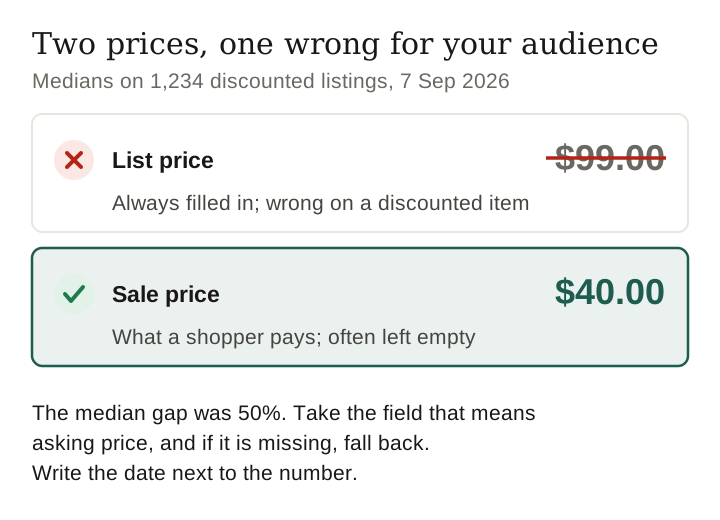
A product feed can carry two prices, and the bigger one is not what a shopper pays. On 5,040 live US listings read on 7 September 2026, 1,805 published both a list price and an asking price, and on the 1,234 that were genuinely discounted the median gap was 50%.
Quote the wrong field and you tell your audience a $40 item costs $99. The list price is the field that is always filled in, so it is the one a tool, a spreadsheet or a quick copy-and-paste picks up first — and on a discounted item it is the wrong one.
There are two prices, not one
Most affiliate product feeds expose a list price and, separately, a sale price. Different networks name them differently, but the relationship is always the same: the list price is what the retailer says the item is worth, and the sale price is what it is being sold for today. Only one of those is a number a shopper will ever see at checkout.
The trap is that the list price is the field that is always populated. The sale price is the one that is often empty, so a tool that reads “the price” and takes the first field it finds will be right on full-price items and wrong on everything discounted — which is exactly the inventory a creator is most likely to be linking.
| What the two fields did | Listings | Share of the 1,805 |
|---|---|---|
| Sale price below list price | 1,234 | 68.4% |
| Sale price identical to list price | 565 | 31.3% |
| Sale price above list price | 6 | 0.3% |
The 1,805 rows of 5,040 that published both fields, 7 September 2026.
How big the gap is
| Measure | Value |
|---|---|
| Median list price on discounted rows | $99.00 |
| Median asking price on the same rows | $40.00 |
| Median discount | 50.0% |
| Overstatement if you quote list across all both-field rows | 85.7% |
Asking price means the sale price where a row carries one.
Fifty per cent is not a typical retail markdown, and that is the first clue about where these rows come from. It is a resale number.
On a peer-to-peer marketplace such as Poshmark, the “list” price is the seller’s own claim about what the item retails for, not a price the marketplace ever charged.
Which listings even carry both
Only 34 of the 81 advertisers in this pull published both fields at all, and one of them supplied most of the rows.
| Advertiser | Rows with both fields | Of which discounted |
|---|---|---|
| Poshmark (resale) | 1,319 | 874 (66%) |
| UnbeatableSale.com | 64 | 64 (100%) |
| TikTok Shop US – Marketplaces | 59 | 46 (78%) |
| Macy’s | 54 | 16 (30%) |
| Miles District | 40 | 39 (98%) |
| Herman Miller | 31 | 31 (100%) |
| Temu | 20 | 20 (100%) |
Advertisers publishing 20 or more rows carrying both fields.
1,319 of 1,805 both-field rows are one resale marketplace. So the headline 50% discount is largely a statement about resale pricing, and a creator working in furniture or appliances will meet this problem far less often than one working in fashion.
The same split shows in the keywords. The seeds that produced hundreds of both-field rows are all resale-heavy — sunglasses 334, wool coat 276, leather boots 255, sleeping bag 253, backpack 217 — while area rug produced 1, espresso machine 14 and robot vacuum 20. If your niche is secondhand, price-checking is not optional. If it is conventional retail, the field is usually just absent and the list price is the asking price.
Keep checking
The six listings where the sale price is higher
Six rows in this pull carry a sale price above their list price, all from one advertiser and all robot vacuums: $999 list against $1,299 asking, $355 against $499, $229 against $299.
We do not know why, and we are not going to guess on the page. What it establishes is narrower and still useful: the two fields are not reliably ordered, so “take the lower of the two” is not a safe rule either. Take the field that means asking price, and if it is missing, fall back — do not take the minimum.
A price check you can run in two minutes
- Open the destination in a private window. Your own browsing history and any personalisation can change what you see. The price your audience meets is the one a stranger meets.
- Read the price on the page, not in the tool. Whatever a dashboard shows you is a copy of a feed that was exported at some earlier point. In this sample the median row was last updated 72 days ago.
- Check whether the number you are about to publish is a strikethrough. If the retailer shows “$99.00 $40.00”, $40 is the price. This is the exact confusion the two feed fields encode.
- Check the variant. A listing often prices the cheapest size or colour and the one in your photograph is a different one.
- Write the date next to the number. Not for the algorithm — so that when someone tells you in November that the price is wrong, you can say what it was in September and mean it.
- Prefer a range or a band to a single figure when you are writing something that will be read for months. “Usually $40–$60” stays true for longer than “$47.99”, and it is not less useful.
Why the wrong price looks right
Publishing the list price as the asking price is the most ordinary way this goes wrong: whatever reads the feed takes the field that is always populated, and on a full-price item that field is correct. On a discounted item it is the bigger number. Two things about the mistake are worth a creator’s attention:
- It looks right. Every price is a real number taken from a real retailer feed. Nothing is invented and no link breaks, so a check that only asks whether the price came from the retailer passes it. The only way to catch it is to compare the two fields, or to compare the number with the live page.
- It is not uniform. In this pull, 1,319 of the 1,805 rows carrying both fields came from one resale marketplace, while area rug produced a single such row. A post full of secondhand finds can be badly wrong while a post of conventional retail is barely affected.
If you find it in something you have already published, correct it by re-reading each price, not by doing arithmetic on the published figures. A number you back-calculate is not a measurement.
What a price check cannot tell you
- Whether the discount is real. A list price is a claim by the seller. Nothing in the feed says the item ever sold at that price.
- What it will cost tomorrow. We have not measured price movement over time on the same rows — that needs two dated pulls and we are not going to imply we have run one.
- Shipping, tax or the checkout total. None of those are in the feed, and on low-value items they change the answer completely.
- Whether your audience sees the same price. Country, membership status and promotions all sit outside this data.
Method
Scope, so this can be repeated rather than believed: root shoppingProducts on the CJ product API, filtered on keywords and advertiserCountries: ["US"], four pages of 100 rows per seed, deduplicated on advertiser plus title plus destination link, then post-filtered on each row’s own targetCountry. Asking price is salePrice where a row carries one and price otherwise; peer-to-peer asks of $500 or more and repdigit asks are dropped as seller placeholders. 5,040 US rows, 81 advertisers, 7 September 2026.
The eighteen seeds, published so the pull can be re-run: electric kettle, air fryer, office chair, standing desk, mechanical keyboard, backpack, sunglasses, leather boots, wool coat, area rug, duvet cover, coffee table, humidifier, robot vacuum, cordless drill, sleeping bag, electric toothbrush, espresso machine.
Frequently asked
Which price does an affiliate feed show?
Usually both. A list price is what the retailer says the item is worth and a sale price is what it is selling for. Only the sale price is what a shopper pays, and it is the field more often left empty.
How big is the difference?
On the 1,234 genuinely discounted listings in this sample the median gap was 50%: a median list price of $99.00 against a median asking price of $40.00.
Do all retailers publish both prices?
No. 34 of 81 advertisers in this pull published both fields, and one resale marketplace supplied 1,319 of the 1,805 rows that did.
Can the sale price ever be higher than the list price?
Yes. Six listings in this sample carried a sale price above their list price, so taking the lower of the two fields is not a safe rule either.
How often should a creator re-check a price?
We cannot give you a measured interval, because that needs two dated pulls of the same rows and we have not run one. What we can say is that the median listing in this sample was last updated 72 days ago.
Last verified 7 September 2026 against 5,040 live US listings, 1,805 of which published both a list and a sale price.
How this page was made. Drafted with AI (Claude); not yet independently re-checked. How we work