Creator Desk
Affiliate commission calculator for creators
Part of: For creators
Enter what you know, see the arithmetic. This does not predict your earnings — it multiplies the numbers you give it, so you can sanity-check a programme's commission rate before you spend a week posting for it.
The formula, so you can check it yourself
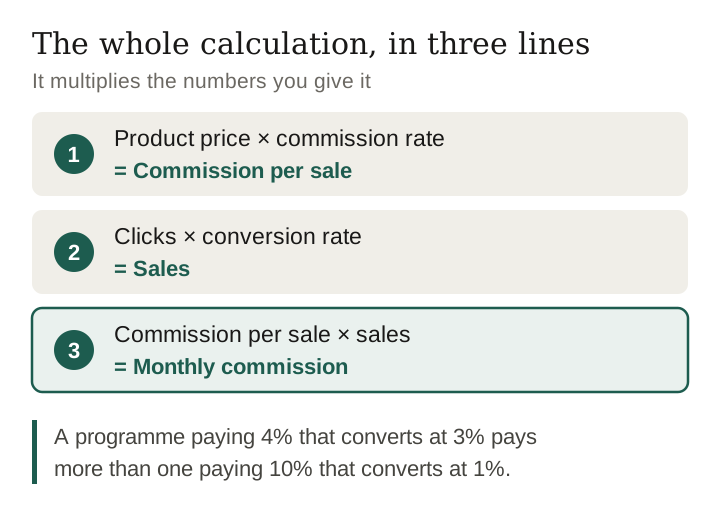
Commission per sale = product price × commission rate.
Sales = clicks × conversion rate.
Monthly commission = commission per sale × sales.
That is the whole thing. Any tool that gives you a different answer is adding an assumption it has not told you about.
Why the conversion rate is the number that matters
Commission rate is the number a programme advertises. But look at the formula: rate and conversion multiply, so a programme paying 4% that converts at 3% pays more than one paying 10% that converts at 1%. Conversion depends on whether the product suits the audience you actually have — which is why a smaller, well-matched audience can out-earn a larger vague one.
What this calculator deliberately will not do
- Guess your conversion rate. The 2% it opens with is a placeholder to show the arithmetic, not an estimate of yours; replace it with your own. A default number dressed as a forecast misleads.
- Assume every click is new. Repeat visitors inflate click counts without adding buyers.
- Subtract returns and cancellations. Programmes such as Amazon Associates and Etsy pay no commission on returned or cancelled orders, so a category where many orders come back can differ from the figure above by a wide margin.
- Account for cookie windows. If a programme's cookie lasts 24 hours and your audience browses for a week, some sales you caused will never be attributed to you.
Questions
Is this a prediction of what I will earn?
No. It is arithmetic on numbers you type in. Your real clicks and conversion rate depend on your audience, your niche and the product, and nobody can tell you those before you have them.
What conversion rate should I use?
Use your own if you have it, from a platform dashboard. If you do not, run the calculation across a range rather than picking one number, and see how far the answer moves.
Does this send my numbers anywhere?
No. The calculation happens in your browser and nothing is stored or transmitted.
How this page was made. Researched and drafted with AI (Claude); checked by a separate automated pass on 10 October 2026. How we work