LinkToLooks · Guides · Creator Desk
Creator Desk
How do you audit 500 affiliate links in an afternoon?
A five-pass method, and the status-code table that stops you deleting links that work.
Part of: For creators
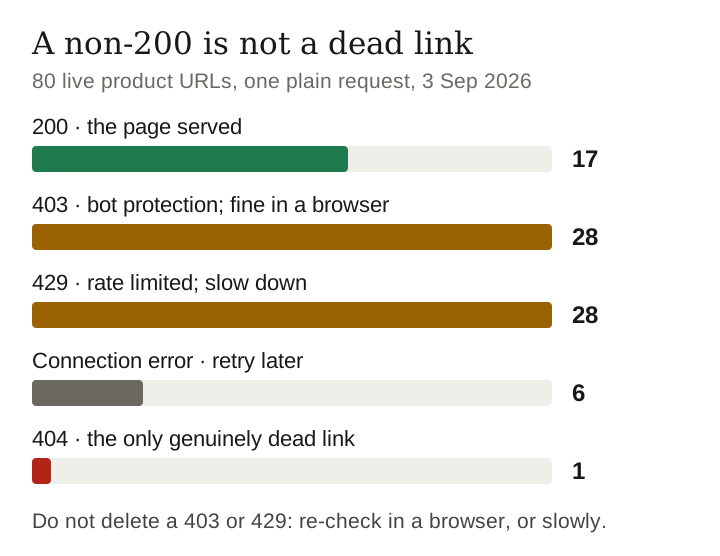
Only 17 of 80 live product URLs answered a plain automated request with a 200 on 3 September 2026. Twenty-eight returned 403, twenty-eight returned 429, six failed to connect and one was a genuine 404. Every one of those URLs came out of a retailer's own in-stock product feed minutes earlier.
So the first rule of auditing links at scale is the one nobody puts first: a non-200 is not a dead link. A checker that treats it as one would have told us 79% of a working catalogue was broken, and a creator acting on that report would delete sixty-three good links.
The status codes, and what each one is worth
This is the table to keep. The counts are from our own 80-URL sample; the interpretations are what each response means when you are checking somebody's shopping links rather than monitoring your own server.
| Response | How many of 80 | What it usually means | What to do |
|---|---|---|---|
| 200 | 17 | The page served. Still worth a glance: a soft 404 is a 200. | Pass, but spot-check the title. |
| 403 | 28 | Bot protection refused an automated client. The link works in a browser. | Do not delete. Re-check by hand or with a real browser. |
| 429 | 28 | Rate limited — you asked one host for too much, too fast. | Slow down and retry. This one is your fault, not the retailer's. |
| Connection error | 6 | DNS, TLS or a timeout. Frequently transient. | Retry once, later, before believing it. |
| 404 | 1 | The only unambiguous failure in the sample. | Fix or drop the link. |
Notice which line is the smallest. One link in eighty was actually dead. Everything else in that table is a story about how the retailer treats robots, and the most common failure in a link audit is not a broken link at all — it is a checker being told to go away.
The five passes
Run them in this order. The sequence works on a site or on a spreadsheet of links just as well.
- Pass one: the internal pass. Before touching the outside world, check that every link you wrote points at something that exists on your own side. Repair or drop links to pages that were never published. It is the cheapest pass because it needs no network at all.
- Pass two: status codes, slowly. One request per URL, a real browser user agent, and a delay between requests to the same host. The 28 rate-limited responses in our sample are what happens when you skip the delay: twenty of the eighty URLs were on one domain.
- Pass three: follow the redirects, deliberately. Record every hop rather than only the destination. A link that now lands on a category page instead of the product is technically alive and commercially dead, and only the chain shows you that.
- Pass four: the images. A HEAD request per image URL. Product images rot independently of product pages, and a post with a broken packshot looks abandoned even when every link works.
- Pass five: eyes on the survivors. Whatever returned 200, open a sample by hand. A soft 404 — a ‘this product is no longer available’ page served with a 200 — passes every automated check ever written.
Keep reading
What we found about redirects
We expected chains and did not find them. Of the 80 URLs:
- 77 redirected zero times. The catalogue's destination URL was the destination.
- Two redirected once, one twice. No chain longer than two hops appeared.
- The host never changed in any of the 80. Every redirect stayed on the same domain.
- Two of the three redirects dropped query parameters. Both were the same retailer, and the parameters it dropped were named
feed_tp,keywordandnetwork— feed-attribution parameters, discarded on the way to a page that returned 200. Small in absolute terms, and the failure mode that matters most: parameters are where tracking lives, and the link looked perfectly healthy afterwards.
The practical reading is that a raw retailer product URL arrives short. Every hop between your reader and that page — a network's redirector, a shortener, a link-in-bio tool — is a hop somebody in the chain added on purpose. That is not an argument against adding them. It is an argument for knowing how many you have added, because each one is a thing that can drop a parameter, and two of our three did.
Images are a separate audit
Product images fail on their own schedule, and a HEAD request answers the question in a fraction of the traffic a page fetch costs. Run them as their own pass. In a study of image hosts in live US affiliate feeds, about one host in five served no usable image on 2 September 2026, which is a high enough rate that any post older than a few months deserves the check.
One caution that applies to images more than to pages: an image host that answers a HEAD request today can start refusing them tomorrow without the image having changed. Re-check before you conclude the picture is gone.
Triage: what to actually fix
Five hundred links produce a long report and most of it is noise. In priority order:
- Genuine 404s and soft 404s. These are the only ones costing you a reader right now.
- Redirects that lost a parameter. The link works, the tracking may not, and nothing in your dashboard will tell you.
- Links to products that resolved but are out of stock. A live page selling nothing is worse than a 404, because the reader spends effort before finding out.
- Broken images. Cosmetic, cheap to fix, and the first thing a reader notices.
- Everything that returned 403 or 429. Bottom of the list, and usually nothing to do at all.
Do the audit on a schedule rather than after a complaint. A creator with a back catalogue would get most of the benefit from once a quarter and all of the benefit from once a month.
What this method cannot do
- It cannot tell you a link earns. Reachability and attribution are different systems. A 200 says the page loaded, not that the click was tracked.
- It cannot see what a phone sees. In-app browsers behave differently from a scripted request, and this method does not touch that.
- It cannot distinguish a bot block from a region block. A 403 from a machine in one country is not necessarily a 403 from another.
- Eighty URLs is a sample. Our 21% success rate reflects the retailers in our pull — two domains supplied nearly half the sample — and yours will differ.
- It is one afternoon. A link that answers today can be a 404 next week, which is the argument for a schedule rather than a one-off.
Frequently asked
How do I check hundreds of affiliate links quickly?
Five passes: internal links first, then status codes with a real user agent and a delay per host, then redirect chains recorded hop by hop, then images by HEAD request, then a human sample of whatever returned 200.
Does a 403 mean my affiliate link is broken?
Almost never. In our 3 September 2026 sample, 28 of 80 live product URLs returned 403 to an automated request and the pages were fine in a browser. Only one URL in eighty was a genuine 404.
Why do I get 429 errors when checking links?
Rate limiting. You are requesting too much from one host too quickly. Twenty of our eighty sampled URLs sat on a single domain, which is exactly how it happens.
What is a soft 404?
A page that says the product is unavailable but returns HTTP 200. It passes every automated check, which is why the last pass has to be a person opening a sample.
How often should a creator audit their links?
On a schedule rather than after a complaint. Monthly captures most of the decay; quarterly is a reasonable floor for a large back catalogue.
Method
- Sample: 80 destination URLs drawn with a fixed random seed from 10,575 live in-stock listings pulled from the CJ product catalogue on 3 September 2026.
- Request: one HTTPS GET per URL with a desktop Chrome user agent, redirects recorded rather than followed automatically, 25-second timeout, up to eight hops.
- Domains in the sample: wayfair.com 20, onbuy.com 27 across two hosts, poshmark.com 6, wayfair.co.uk 6, kids-world.com 4, temu.com 3, jossandmain.com 3, birchlane.com 2, and a tail of others.
- No retry was applied, deliberately: the point was to see what a single naive pass reports, which is what most link checkers do.
- Parameter loss was measured by comparing the query keys on the starting URL with those on the final URL.
Keep reading
Last verified 3 September 2026 against 80 live product URLs sampled from this run's catalogue pull and requested individually
How this page was made. Drafted with AI (Claude); not yet independently re-checked. How we work