LinkToLooks · Guides · Creator Desk
Creator Desk
Where can a streamer put affiliate links on Twitch, and what does Twitch make you disclose?
Twitch's own rules exempt an affiliate link dropped in answer to a chat question from its disclosure tool — and ban an entire category of affiliate codes outright — so the useful question is not whether you may link, but which of three places you are linking from.
Part of: For creators
You can put affiliate links in panels (as Markdown), in chat, and in chat-bot commands. Twitch's Branded Content Guidelines name “you or your mods share affiliate links in response to questions from your community” as a case where its disclosure tool is not required.
That exemption is from Twitch's tool, not from the law: its own Terms of Service require branded content to follow the FTC's guides. And affiliate codes for slots, roulette and dice sites are banned on Twitch outright. Read on Twitch's own pages, 26 September 2026.
Panels: what the editor accepts
Panels are the boxes under your video player. Twitch's help article on editing them is short and specific, which makes it more useful than most of what is written about it. Panels sit under the player while you are live and in the About section of your channel while you are offline, and you edit them from either place.
| Panel field | What Twitch says it takes | What that means for a link |
|---|---|---|
| Title | Text | No link |
| Image | Under 1 MB; resized to at most 320 px wide and 600 px high | Design at 320 px wide or it gets scaled |
| Image link | An “embedded image link” | The whole image becomes clickable |
| Description | Markdown, “sorry, no HTML” | Links written as Markdown, several per panel |
Source: Twitch Help, “How to Edit Info Panels”, read 26 September 2026.
Two things follow. First, an image panel carries exactly one destination, so a “my gear” banner linking to a single storefront page is the natural shape, not a banner per product. Second, because descriptions are Markdown rather than HTML, you cannot add attributes to a link; there is no way to mark it sponsored in the markup, so any disclosure has to be words a viewer reads.
Twitch's own Enforcement Notes add one limit that catches people: links to your other social profiles in panels are fine, but you may not use your bio or panels to push viewers to a livestream on another platform. A “watch me on the other site” panel is a violation; a gear list is not.
Chat and bots: who the link filter lets through
Chat is where most streamer affiliate links actually get clicked, because it is where the question gets asked. Twitch gives channels a Block Hyperlinks switch on the Moderation Settings page. Its help article describes exactly what it does:
- Messages containing links go to the AutoMod queue for moderator review instead of straight into chat, and the sender sees “Your message is being reviewed”.
- Links posted by you, your moderators, admins or VIPs always pass through without being held.
- You can add specific URLs, or any URL from a domain, to your Blocked or Permitted Terms.
- Third-party bots “look like any other user in chat, but are typically moderators” — and Twitch says they are not affiliated with it.
So a bot with moderator status can post your links with the filter on. That is the whole mechanism behind the familiar !gear command.
Our position: do not put an affiliate network's domain on your Permitted Terms list. Permitting a domain lets every viewer's link from that domain through, including somebody else's affiliate link for the same product. The permission you want is already attached to the right people — you, your moderators and your bot — so the permitted-domain list only adds the case you were trying to prevent. This is our reading of how the two settings combine; Twitch's article does not spell out the interaction.
Keep reading
The branded content tool and its affiliate exemption
Twitch has a disclosure switch: Stream Manager, Edit Stream Info, tick Branded Content. Viewers then see a message that the stream “includes paid promotion” when they join, and it stays on screen for 10 seconds. Twitch says using it does not affect discovery and that ads may still run. It started enforcing the tool on 1 July 2023.
The guidelines are unusually concrete about when you need it, and they list their own examples. Laid side by side:
| Twitch's example | Tool required? |
|---|---|
| Sponsored gameplay, paid unboxings, product placements, endorsements | Yes |
| Branded channel panels, brand logo overlays (as part of a paid deal) | Yes, when the branded content is central to the stream |
| Your offline channel page has panels promoting a brand or sponsorship | No |
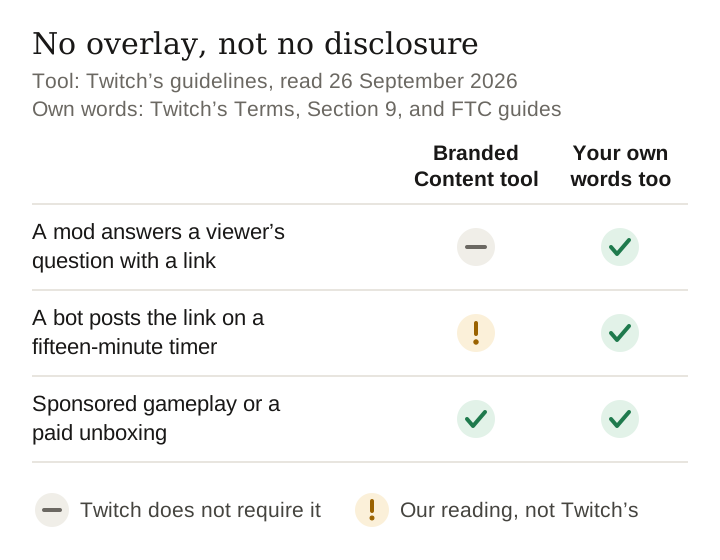
| You or your mods share affiliate links in response to questions from your community | No |
| You mention a sponsor in passing, without actively promoting it for payment | No |
| Merchandise in view that you are not paid to discuss | No |
| Promoting your own products | No (legal duties may still apply) |
| Paid by a charity or company to fundraise | Yes |
Source: Twitch Help, “Branded Content Guidelines”, read 26 September 2026. Rows paraphrase Twitch's own examples; the bold row is quoted.
The test Twitch gives is whether branded content is “a central and intentional element of the livestream”, and whether you received anything of value. Failing to disclose earns an email warning first; repeated failure can lead to suspension. Twitch also says there is no penalty for using the tool when you are unsure.
Notice what the affiliate exemption is conditioned on: in response to questions. A viewer asks what headset you use and a mod drops the link — that is the case Twitch describes. A bot that posts the same link on a fifteen-minute timer is not answering anyone. We would treat a timed affiliate message as promotion and switch the tool on, since Twitch has told you that erring that way costs nothing.
Where Twitch's exemption stops
The same company that exempts the link from its tool says, in Section 9 of its Terms of Service (last modified 12 August 2026), that you are “solely responsible” for making branded content comply with advertising law, “including without limitation the U.S. Federal Trade Commission's Guidelines”. Twitch's FAQ says the same about the tool itself: using it “will not always be sufficient” to meet legal obligations.
A commission is a material connection. So the practical rule is simple: the exemption means no overlay, not no disclosure. Put the words in the message that carries the link — for example, “affiliate link, I earn a commission” — and put the same words in the bot command's text so they travel together.
This is also where Twitch parts company with Meta. On the same day we read Instagram's help page on branded content, whose scenario table says a post with an affiliate product link should carry the paid partnership label because commissions “constitute an exchange of value”. The same link needs Meta's label on Instagram and does not need Twitch's tool in a chat reply. Neither platform label is the legal disclosure; both platforms say so.
What you cannot link at all
| Category | Twitch's rule | Where it is written |
|---|---|---|
| Slots, roulette, dice sites | No links or affiliate codes; named domains stake.com, rollbit.com, duelbits.com, roobet.com, blaze.com, gamdom.com may not be linked in chat | Community Guidelines, Prohibited Gambling Content |
| Skins gambling | Promotion or sponsorship prohibited | Same, Enforcement Notes |
| Sports betting, fantasy sports, poker | Broadcasting these sites is permitted “at this time” | Same, Enforcement Notes |
| Another live-streaming platform | May not drive viewers there via bio, panels, QR codes, chat commands | Community Guidelines, Spam, Enforcement Notes |
| Weapons, tobacco and vapes, adult products, payday loans, MLMs, prescription drugs, cannabis, political content | Not allowed as branded content | Branded Content Guidelines |
| Alcohol | Allowed as branded content, marked as mature | Branded Content Guidelines |
All read on Twitch's own pages 26 September 2026.
The gambling line is the one to check before joining any programme that pays streamers per sign-up. The rule covers the code, the link, a banner, and even saying the site's name out loud to send chat there.
What we could not verify
- Whether panels display in the Twitch mobile app, and how. The help article describes the channel page and the About section and says nothing about mobile. We did not guess. If your audience is mostly on phones, check your own channel on your own phone before relying on a panel.
- How Twitch treats a timed bot message. The exemption says “in response to questions”. Our reading above is a position, not a quotation.
- Click behaviour. We have no streamer data, and we did not post anything on Twitch to test it.
What to do this week
- Rewrite your link command's text so the disclosure is inside it, not in a panel viewers never scroll to.
- Check your moderator list and bot permissions; only those accounts should be posting product links.
- Remove any affiliate network domain from Permitted Terms if you added one.
- Audit sponsors against the gambling list before the next deal lands.
- Tick Branded Content for any stream where a product is the point of the stream, even if only part of the deal is paid.
Frequently asked
Can you put affiliate links in Twitch panels?
Yes. Twitch's panel editor accepts a title, an image, an image link and a description in Markdown, and its help article says you can add links in the description using Markdown. HTML is not accepted. Images must be under 1 MB and are resized to at most 320 pixels wide by 600 high.
Do I have to use Twitch's branded content tool for affiliate links?
Not when you or your moderators share affiliate links in response to questions from your community. The tool is required when branded content is a central and intentional element of the livestream. The exemption is from Twitch's tool only, not from advertising law.
Will Twitch's link filter block my own affiliate links?
No. With Block Hyperlinks on, viewers' links go to the AutoMod queue, but links from the broadcaster, moderators, admins and VIPs always pass through. A chat bot with moderator status passes too.
What affiliate links does Twitch ban?
Links or affiliate codes to sites with slots, roulette or dice games; six named gambling domains in chat; skins-gambling sponsorships; and branded content for weapons, tobacco and vaping, adult products, payday loans and prescription drugs, among others.
Do I still need to say it is an affiliate link in chat?
Yes. Twitch's Terms of Service require branded content to comply with the FTC's guides, and a commission is a material connection. A short “affiliate link, I earn a commission” in the same message travels with the link.
Method and scope
- Every Twitch page below was opened in a real browser on 26 September 2026. Twitch's help and safety centres serve an empty shell to scripted requests, which is why an earlier attempt at this page on 3 September was set aside until the sources could be read this way.
- How to Edit Info Panels — panel fields, Markdown, image limits.
- Branded Content Guidelines — the tool, the examples, the affiliate exemption, the prohibited categories.
- How to Manage Harassment in Chat — Block Hyperlinks, who passes, permitted and blocked terms, bots.
- Community Guidelines — Spam and Prohibited Gambling Content sections and their Enforcement Notes.
- Terms of Service, Section 9, last modified 12 August 2026.
- Meta comparison: What is considered branded content, Instagram Help Center, read the same evening.
- We did not post on Twitch, run a bot, or test any product shown here. This page is not legal advice.
Last verified 26 September 2026 against Twitch's help centre, safety centre and Terms of Service, each read on its own page
Keep reading
How this page was made. Drafted with AI (Claude); not yet independently re-checked. How we work