LinkToLooks · Guides · Creator Desk
Creator Desk
Do links in a TikTok bio actually work?
Part of: TikTok for creators
Yes, but only from the profile’s website field, and that field is not available to every account. TikTok’s help article on profile links covers the profile’s Links option, not URLs typed into a video caption, a comment or the bio text. TikTok’s own help article, in a copy readable without JavaScript (Wayback Machine, 13 December 2025), says a website link needs 1,000 followers or more, or a Registered Business Account. The live article now renders only with JavaScript, so this page also gives you the check that settles it for your account in about a minute.
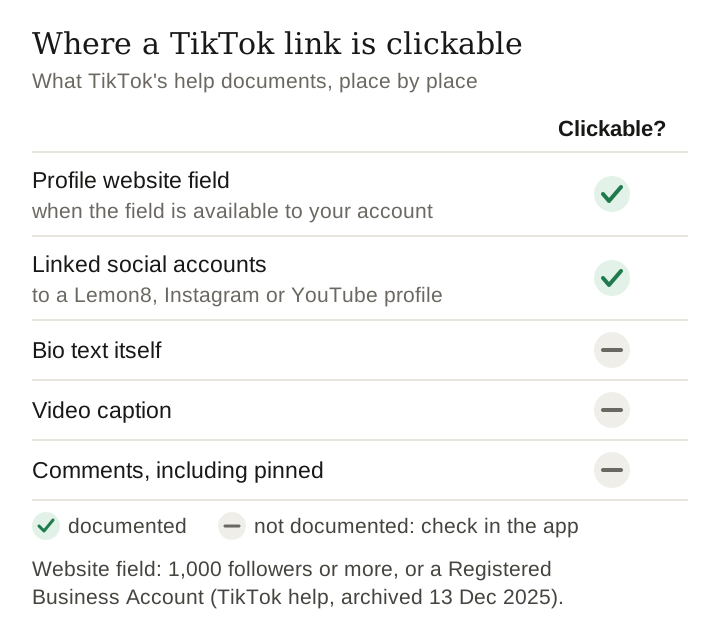
Where a link is and is not clickable
| Placement | Clickable? | What actually happens |
|---|---|---|
| Profile website field | Yes, when the field is available to your account | Renders as a tappable link on your profile. This is the reliable placement. |
| Bio text itself | Not documented | TikTok’s help does not document bio-text URLs as clickable. People can read one and retype it. |
| Video caption | Not documented | TikTok does not document caption URLs as clickable. A verified business account can attach a destination link to a video as a separate feature. |
| Comments, including your own pinned comment | Not documented | Not documented as tappable. Still useful as a signpost to the profile. |
| Linked social accounts | Yes, to those platforms | Added through the same Links option as a website, but it goes to a Lemon8, Instagram or YouTube profile rather than an arbitrary URL. |
The practical consequence is that every link you want to give a TikTok viewer has to travel through one profile slot or through in-app commerce features, unless the account is a verified business account, which TikTok lets attach a destination link to videos. That is the constraint the whole link-in-bio category exists to work around.
The 60-second test on your own account
- Open your profile and tap Edit profile.
- Next to Links, tap Add. If a website option is offered, your account can carry a bio link; if it is not, it cannot, today.
- If it is there, paste a URL and save.
- Open your own profile from a logged-out or second device and tap the link. This step matters: a link that saves is not necessarily a link that renders to other people.
- Confirm the destination loads inside the in-app browser, not just in your phone’s main browser.
This test is worth more than any article on the subject, this one included, because it reports the state of your account right now rather than a rule that may have changed since it was written.
What we could verify, and what we could not
We think publishing the gap is more useful than filling it with a number, so here is exactly what happened when we went looking on 1 September 2026. Note the second row: no source settles it, so check it in the app.
| Claim | Our verification status |
|---|---|
| A tappable website field exists on TikTok profiles | Supported by TikTok’s own help article (Wayback Machine copy, 13 December 2025): ‘You can add a link to your website on your TikTok profile’. Confirm it for your account with the test above. |
| Captions and comments are not hyperlinked | Not verified from a source; TikTok’s help article on profile links does not address it. Check it in the app rather than taking our word. |
| The website field requires a specific follower count | 1,000 followers or more, per TikTok’s own help article in its Wayback Machine copy of 13 December 2025. The live article renders only with JavaScript, so it cannot be shown to be unchanged today. |
| Business accounts get the field regardless of followers | Only a verified business account, per the same article (it says ‘Registered Business Account’, which TikTok’s Business Help Center now calls a Verified Business Account, granted after business verification). |
| The rules are identical in every country | Not verified, and we would not assume it. |
What to do if you do not have the field
- Send people to a platform where you do have a link. Naming the handle in the video and putting the link on that profile costs one extra tap and works today.
- Use in-app commerce where you are eligible for it, which routes around the bio slot entirely.
- Do not paste URLs into captions as a workaround. They are not documented as clickable, they clutter the caption, and a URL that cannot be tapped is a reason for a viewer to leave.
- Keep publishing, or verify as a business. TikTok’s own article gives two routes: 1,000 followers, or a Registered Business Account, which TikTok now grants after business verification.
The one-slot problem, and the real fix
Even with the field enabled, a bio link is a single door for an entire catalogue. A viewer who saw one specific product in one specific video lands on a page that is not about that product, and has to hunt for it.
- The generic fix is a link-in-bio page: a list of destinations. It is a weak fit for product discovery because it makes the viewer search again.
- The better fix is a destination organised by product rather than by link, so the thing the viewer came for is findable without hunting.
- Whichever you use, put the specific product name in the video itself. A viewer who knows what to look for gets through a list; a viewer who does not, does not.
Last verified 10 October 2026; the eligibility rule is quoted from TikTok's own help article as archived by the Wayback Machine on 13 December 2025, because the live article renders only with JavaScript. Link behaviour in captions, comments and bio text is stated as in-app behaviour to check, not as something a source confirms
Frequently asked
Do TikTok bio links work?
Yes, from the profile’s website field, when that field is available to your account. TikTok’s help does not document links in captions, the bio text or comments as clickable.
How many followers do you need for a link in your TikTok bio?
TikTok’s own help article, in a Wayback Machine copy from 13 December 2025, says 1,000 followers or more, or a Registered Business Account. The live article renders only with JavaScript, so check your own account: open Edit profile, tap Add next to Links, and see whether a website option is offered.
Can you put a clickable link in a TikTok caption?
TikTok does not document typed caption URLs as clickable. A verified business account can attach a destination link to a video as a separate feature, per TikTok’s Business Help Center.
Are links in TikTok comments clickable?
TikTok does not document them as clickable, including in your own pinned comment. A pinned comment is still useful as a signpost to the link on your profile.
What should I do if my account has no website field?
Name another platform in the video and put the link on that profile, or use in-app commerce if you are eligible. Do not paste URLs into captions as a substitute.
Sources and scope
- The website and social-account links are supported by TikTok’s archived help article; caption, comment and bio-text behaviour is stated as in-app behaviour to check, not from a source.
- TikTok Business Help Center: account entitlements — Verified Business Accounts (formerly Registered Business Accounts) and video destination links.
- TikTok Support, linking a website or social account — the article that should carry the eligibility rule. It redirects to a JavaScript-rendered FAQ page that returned no body text to our client, so the threshold above is quoted from its Wayback Machine copy of 13 December 2025.
- Related: how to become a TikTok affiliate, which documents the same documentation problem from the commerce side.
How this page was made. Researched and drafted with AI (Claude); checked by a separate automated pass on 10 October 2026. How we work