LinkToLooks · Guides · Creator Desk
Creator Desk
How long does Google take to index a new creator page?
Google’s own answer is a few days to a few weeks, with no guarantee. Here is how to find out where each of your own pages actually stands, and what to do about it.
Part of: For creators
Google’s documentation says crawling can take anywhere from a few days to a few weeks, and that asking for a crawl does not guarantee a page will be included at all. There is no general number beyond that, and anyone quoting one for your site is guessing.
What you can get is a per-page answer. Search Console’s URL Inspection tool tells you which of three states each of your pages is in, and the three states need three different responses. That is the useful part, and it is free.
What Google says about timing
- Crawling takes days to weeks. Google’s page on asking for a recrawl says crawling can take anywhere from a few days to a few weeks, that there is a quota on individual URL submissions, and that asking repeatedly for the same URL does not get it crawled any faster.
- Nothing is guaranteed. Google’s guide to how Search works says it does not guarantee it will crawl, index or serve a page, even one that follows its rules, and that not every page it processes will be indexed.
- Discovery comes first. Google learns about a page from a link on a page it already knows, or from a sitemap or a crawl request. A page nothing points to waits.
Put together: on the same site, one new page can be indexed quickly while another waits for weeks. That is why the useful question is not “how long” but “which state is this page in”.
The three states, and what each one means
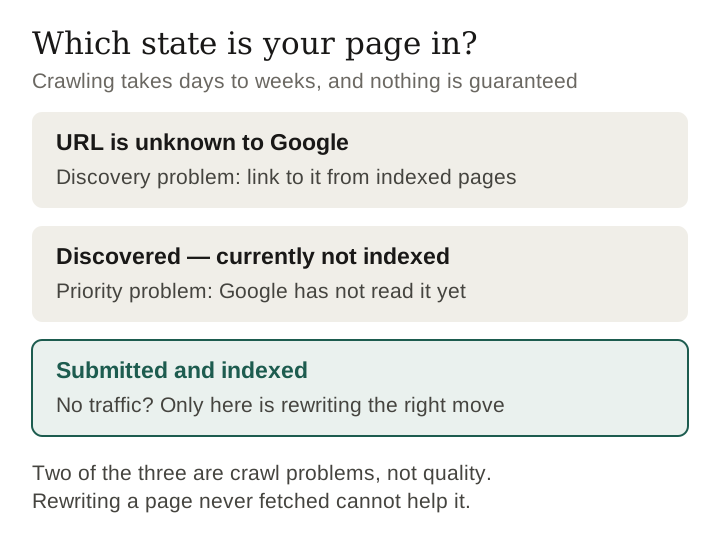
Search Console reports a coverage state per URL. Three matter for a new page, and the difference between them is the difference between three completely different problems.
Submitted and indexed
Google has crawled the page and put it in the index, and URL Inspection shows the date of the last crawl. Google’s help is careful here: an indexed page is eligible to appear in search results, not guaranteed to.
Discovered — currently not indexed
Google knows the URL exists, from the sitemap or a link, and has not fetched it yet. Google’s page-indexing help says the crawl is typically rescheduled because it was expected to overload the site. This is the state people mean when they say Google “rejected” a page, and that reading is wrong: nothing has been judged, because nothing has been read.
URL is unknown to Google
Google has not seen the address before. Being in a submitted sitemap does not change that on its own — Google’s sitemap documentation says a sitemap does not guarantee crawling or indexing — so a page can sit in a submitted sitemap and still be unknown.
This is the distinction worth taking away. Two of those three states are crawl problems and only one is a quality problem. Rewriting a page that has never been fetched cannot help it.
Keep reading
How to check your own pages
- Verify your site in Search Console and submit a sitemap.
- Pick a sample of your own pages that spans several publish dates — a few from this week, a few from last week, a few older — and run each through URL Inspection.
- Record three things per page: the state, the last-crawl date or its absence, and the date the page was published.
- Sort by publish date. If older pages are mostly indexed and newer ones mostly unknown, you are looking at an ordinary wait. If pages of every age are unknown, discovery is the problem, not time.
- If you split the sample by kind of page, do not over-read the difference: kind of page moves together with length, publish date and how much original work a page carries, and a small sample cannot separate them.
- Repeat in a month on the same pages, and record the date with every reading. A state is a snapshot, not a verdict.
What this contradicts
Three claims are repeated constantly in creator SEO advice. Google’s own documentation does not support any of them as stated.
- “A new site takes weeks to get indexed.” Sometimes. Google’s range is a few days to a few weeks, and it gives no floor or ceiling for any particular page.
- “Submit to the sitemap and it will be indexed.” Google says a sitemap helps it discover URLs and does not guarantee they will be crawled and indexed.
- “Indexing is a queue.” Google describes rescheduling crawls so as not to overload a site, and says not every page it processes will be indexed. Pages do not simply clear in the order they were published.
What a creator can actually do
- Find out which of the three states you are in before you change anything. Search Console’s URL Inspection tool is free and gives a per-URL answer. Rewriting a page that has never been crawled is effort spent on the wrong problem.
- If pages are unknown, the problem is discovery. Internal links from pages that are indexed are the cheapest route, because those are the pages a crawler already visits.
- If pages are discovered and not crawled, the problem is priority. Nothing you write on the page changes that; Google has not seen the page. What changes it is signals from elsewhere.
- If pages are indexed and get no traffic, now it is the content. That is the only one of the three where rewriting is the right move.
- Do not publish faster in response to slow indexing. It is the reflex and it makes the discovery problem worse, not better.
What this page cannot tell you
- How long your page will take. Google gives a range, not a promise, and says requesting a crawl does not guarantee inclusion.
- Whether an indexed page ranks. Indexing is eligibility, not traffic, and says nothing about position.
- Why any individual page was skipped. Search Console reports the state, not the reason.
Frequently asked
How long does Google take to index a new page?
Google’s documentation says crawling can take anywhere from a few days to a few weeks, and that requesting a crawl does not guarantee the page will be included at all. For your own page, the URL Inspection tool in Search Console is the only reliable answer.
Does submitting a sitemap get a page indexed?
No. Google says a sitemap helps it discover URLs but does not guarantee they will be crawled and indexed. A sitemap makes a URL discoverable; it does not make it crawled.
What does ‘Discovered — currently not indexed’ mean?
Google found the URL but has not crawled it yet; its help page says the crawl is typically rescheduled so as not to overload the site. The page has not been read, so it has not been judged.
Should I rewrite a page that is not indexed?
Only if it has been crawled. If URL Inspection shows no last-crawl date, Google has never read the page and rewriting it cannot change the outcome.
Sources
- Crawl timing, submission quotas and no guarantee of inclusion: Google Search Central, Ask Google to recrawl your URLs.
- No guarantee of crawling, indexing or serving, and how URLs are discovered: Google Search Central, In-depth guide to how Google Search works.
- A sitemap does not guarantee crawling or indexing: Google Search Central, What is a sitemap.
- What each state means: Search Console Help, URL Inspection tool and Page indexing report.
- All read 29 September 2026. This page describes a procedure; it reports no measurement of this site or any other.
Last verified 29 September 2026 against Google’s Search Central and Search Console Help documentation
How this page was made. Drafted with AI (Claude); not yet independently re-checked. How we work