LinkToLooks · Guides · Creator Desk
Creator Desk
Why are creator pages ‘discovered but not indexed’?
Google’s own definition says the page was found and not yet crawled. That makes it a fetching question rather than a quality verdict, and it is worth checking whether the bucket that matters on your site is the one Google has never heard of.
Part of: For creators
“Discovered — currently not indexed” means Google found the URL and has not crawled it. Google’s own Page indexing help says the crawl was typically rescheduled because it was expected to overload the site, and that this is why the report shows no last crawl date for these pages.
That inverts the usual advice, which treats the discovered bucket as the problem to solve and assumes a page Google knows about is a page Google has considered. It has not considered it. It has not read it. And there is a second bucket the report does not show you: URLs Google has never encountered, which the URL Inspection tool reports as “URL is unknown to Google”. Count both before you decide which one is your problem.
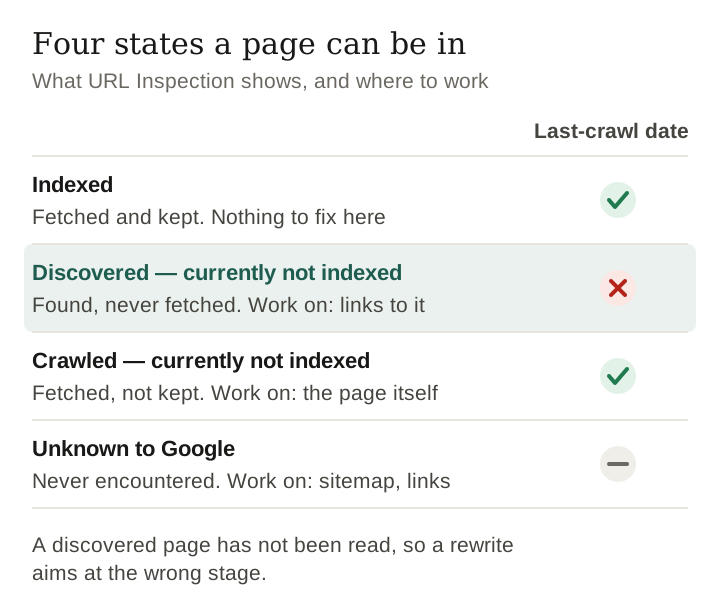
What the label actually means
Google’s own wording for this state is that the page was found but not crawled yet: typically Google wanted to crawl it, the crawl was expected to overload the site, and so the crawl was rescheduled. Two words in that do the work.
Not crawled. The page has never been fetched. Google’s help page says this is why the last crawl date is empty for these URLs, so the quickest test of the state is whether a last-crawl date exists at all.
Not judged. Nothing about the page’s content has been assessed, because the content has not been read. Reading the label as “Google saw it and thought it was thin” is the single most common mistake made about it, and it sends people to rewrite pages that were never opened.
Sorting your own pages by state
The split between these states depends on the site, so nobody else’s numbers will tell you yours. Measuring it takes an afternoon.
- Draw a sample across the whole sitemap. Take every nth URL from your sitemap rather than your newest pages. A sample weighted toward recent posts measures the queue, not the site.
- Inspect each URL. Use the URL Inspection tool in Search Console, or the URL Inspection API on a verified property. Google sets a daily limit on inspections per property, so a few dozen URLs is a practical sample.
- Put each one in a state, using the table below, and note whether a last-crawl date is shown.
- Split by page type if you have a theory. If you suspect one kind of page is being skipped, give it its own column and test the theory rather than assuming it.
- Repeat the same sample a month later. Same URLs, same method. Part of the discovered bucket is a queue, and only a repeat shows you whether it is moving.
| State | What URL Inspection shows | What it means | Where to work |
|---|---|---|---|
| Indexed | URL is on Google, with a last-crawl date | Fetched and kept | Nothing to fix here |
| Discovered — currently not indexed | Not on Google, no last-crawl date | Found, never fetched | Crawl priority: links from pages already crawled, fewer competing URLs |
| Crawled — currently not indexed | Not on Google, with a last-crawl date | Fetched, not kept for now | The page itself. Google says there is no need to resubmit these for crawling |
| Unknown to Google | “URL is unknown to Google” | Never encountered | Discovery: a sitemap entry and links from your other pages |
Most advice fixates on the second row. Before working on it, check the size of the fourth: a page Google has never encountered cannot be helped by anything you do to its content, and the fix for it is discovery, not quality.
Keep reading
The causes you can and cannot tell apart
Search Console reports the state, never the reason. Here is what can be supported for each common explanation, and where to look.
| Cause | Can you tell? | What to check |
|---|---|---|
| Crawl budget — the site is not worth much fetching yet | Partly | Google’s crawl-budget guide is written mainly for very large sites, but it names sites with a large share of URLs in this state among its readers, and says URLs that are more popular on the internet tend to be crawled more often. The Crawl Stats report shows how often Google fetches a root-level property. |
| The page is genuinely thin or duplicated | No | Google has not read it, so this cannot be the reason it was skipped. It can still be a reason it fails later. |
| Discovered too recently to be reached | Partly | Google’s indexing help says indexing is never instant, even when you request a crawl. Some of the bucket is simply a queue, and it clears without anyone doing anything. |
| Internal linking too weak to signal importance | Partly | Google says every page you care about should have a link from at least one other page on your site. Count the internal links pointing at each discovered URL; an orphan is the first thing to fix. |
| Technical blocking — robots, noindex, canonical | Yes | URL Inspection reports whether robots.txt allowed the crawl and whether the page disallowed indexing, and shows the canonical. Rule these out first; they are the causes the tool names outright. |
The row marked “No” is the one worth dwelling on, because it is the one most advice tells you to fix.
The advice that does not follow
- “Rewrite the page to improve quality.” It has not been read. This is the clearest case of effort aimed at the wrong stage.
- “Resubmit the sitemap.” The URL is already discovered. That is what the label means. Resubmitting announces something already known.
- “Publish more so the site looks active.” More URLs on a fixed crawl budget makes each one less likely to be fetched, not more. Google’s crawl-budget guide warns that time spent crawling URLs it shouldn’t can stop its crawlers exploring the rest of your site.
- “Delete the page.” Possibly right for a genuinely thin page, but you are deleting on a verdict that was never issued.
What actually moves a page out of the bucket
- Link to it from a page that is already indexed. Those are the pages a crawler demonstrably visits, and Google says it uses links to find new pages to crawl. This is the only lever most creators hold outright, and it costs nothing.
- Give the crawler less to choose from. Fewer, better pages beats more pages when the constraint is fetch budget rather than quality.
- Earn a link from somewhere already crawled often. Slow, unglamorous, and the only thing that changes the budget itself. It has to be earned — bought and exchanged links are against Google’s policies and we do not use them.
- Wait, and re-measure rather than re-guess. Part of this bucket is a queue, and Google says indexing is never instant. Re-inspect the same sample a month later before you change anything.
Frequently asked
What does ‘Discovered — currently not indexed’ mean?
Google knows the URL exists and has not crawled it. Google’s Page indexing help says the crawl was typically rescheduled because it was expected to overload the site, which is why the report shows no last crawl date for these pages.
Is it a quality penalty?
It cannot be a judgement of the content, because the content has not been read. It is a fetching decision, not an assessment.
Is discovered-not-indexed the biggest bucket?
Not necessarily, and you can check. A URL Google has never encountered is not ‘discovered’ at all: the URL Inspection tool reports it as ‘URL is unknown to Google’. Inspect a sample spread across your sitemap and count both buckets before deciding which one to work on.
Will publishing more pages help?
On a fixed crawl budget it works against you: more candidate URLs means a smaller share of them gets fetched. Google’s crawl-budget guide warns that time spent crawling URLs it shouldn’t can stop its crawlers exploring the rest of a site.
How do I check which state my pages are in?
The URL Inspection tool in Search Console, one URL at a time, free, within a daily limit per property. The field that matters most is whether a last-crawl date exists at all.
Sources and limits
- Page indexing report — Search Console Help, read 29 September 2026: the definitions of “Discovered — currently not indexed” and “Crawled — currently not indexed”, the empty last crawl date, and “indexing is never instant”.
- URL Inspection tool — Search Console Help, read 29 September 2026: “URL is unknown to Google”, the last-crawl, crawl-allowed and indexing-allowed fields, and the daily inspection limit.
- Optimize your crawl budget — Google’s crawling documentation, read 29 September 2026. It is written for very large, frequently updated sites and says a site without a large number of rapidly changing pages does not need it; it also names sites with a large share of discovered-not-indexed URLs among its readers.
- Link best practices for Google — Google Search Central, read 29 September 2026: links as the way Google finds new pages, and a link to every page you care about.
- Crawl Stats report — Search Console Help, read 29 September 2026: root-level properties only, and Google says a site under a thousand pages should not need it.
- Not measurable: why any individual page was skipped. Search Console reports the state, never the reason.
- This page quotes no figures from our own site. The definitions are Google’s; the procedure is one you run on yours.
Keep reading
Last verified 29 September 2026 against the Google Search Console Help and Google developer documentation pages listed above
How this page was made. Drafted with AI (Claude); not yet independently re-checked. How we work