LinkToLooks · Guides · Creator Desk
Creator Desk
Internal links are necessary and nowhere near sufficient
Internal links decide whether Google can find a page. They do not decide whether it gets indexed. What they do, what they cannot do, and how to check your own site in an afternoon.
Part of: For creators
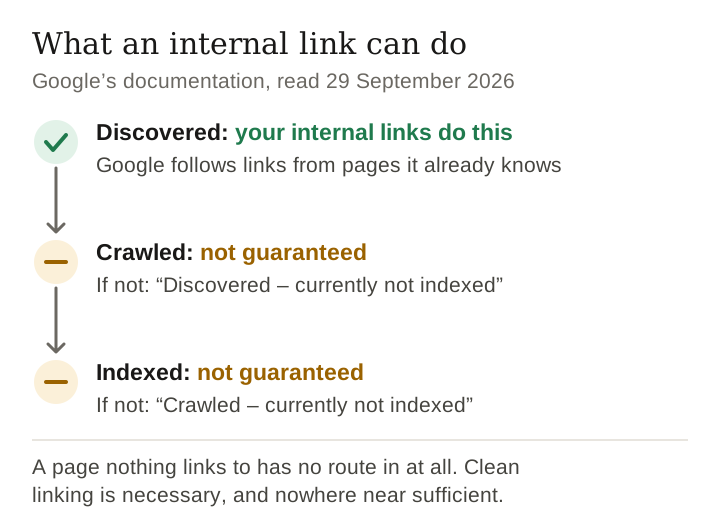
Internal links are how a crawler finds most of your pages, and they are the one discovery signal you control outright. They are not an indexing switch. Google’s own documentation says both halves: it discovers new pages by following links from pages it already knows, and it does not guarantee that a page it finds will be crawled, indexed or shown.
So the job is narrower than most advice makes it sound. Make sure no page on your site is unreachable, make sure the pages you care about most are the ones your own site links to most, and then stop expecting links to do the rest. An average that counts your own navigation is not measuring editorial linking at all, and most reporting on this counts it.
Why this is the lever creators actually hold
Almost everything that determines whether a page gets found is outside your control. Whether anyone links to you, how much crawl budget you are given, whether a platform decides your posts are indexable at all. Internal links are the exception: they are entirely yours, they cost nothing, and they are the only signal you can add this afternoon.
They do three separate things, and conflating them is why advice about them is so vague.
- Discovery. A crawler finds pages by following links. A page nothing links to is reachable only from the sitemap, and a sitemap is a suggestion: Google says it finds new pages by following links from pages it already knows, and that submitting a sitemap does not guarantee every URL in it will be crawled or indexed.
- Priority. Which of your pages matter is something you communicate by how many of your own pages point at them. Nothing else you write says it.
- Readers. The one everybody forgets, and the only one that pays off on day one. A reader who finishes a page and finds the obvious next one has been served; a reader who finds nothing goes back to search.
Keep reading
And what it does not do
Here is the part that would be left out of a page written to sell you an internal-linking service.
Google is plain about it. Its guide to how Search works says indexing is not guaranteed and that not every page it processes is indexed. Search Console’s Page indexing report has one status for pages Google has found but not yet crawled (“Discovered – currently not indexed”) and another for pages it crawled and left out (“Crawled – currently not indexed”). An internal link can get a page discovered. It cannot, on its own, get the page crawled or indexed.
Clean internal linking is necessary — a page nothing links to has no route in at all — and it is nowhere near sufficient. Anyone telling you internal links are a ranking trick is describing a site that had other things going for it.
What internal linking genuinely buys a creator is that no page is unreachable, and that the pages you care about most are the ones your own site points at most. Both are worth having. Neither is a shortcut.
Checking your own site for orphans
This is the check to run before you change anything, and it needs nothing but a list of your own pages and a way to read their links.
- List every page you want found. Your sitemap is the easiest source; a spreadsheet of your own URLs works too.
- Extract every internal link. For each page, record every
hrefthat points at your own domain. De-duplicate per page and drop links from a page to itself. - Separate navigation from editorial links. A link in your menu or footer appears on every page, so it says nothing about which pages matter. Count it separately, or leave it out.
- Count inbound editorial links per page. A page at zero is an orphan, reachable only through the sitemap. A page at one is a single edit away from becoming one.
- Read the distribution, not the average. The shape to aim for is nothing at zero and very little at one, with your most important pages near the top. A mean that includes navigation hides all of that.
- Then check indexing separately. Search Console’s Page indexing report, or URL Inspection on a single page, tells you what Google did with a page. Your link count cannot.
The transferable point. Orphan pages are not a discipline problem, they are a process problem, and the fix is a step that happens automatically — a publishing check that refuses a page nothing links to — rather than a note in a checklist.
Building the structure, in the order that works
- Group before you link. Decide the four or five topics you publish about. Links inside a topic are worth more to a reader than links across topics, and a crawler reads the same grouping.
- Give each topic one page that lists the rest. Ours are hubs; a creator’s might be one page per category. This is the page you link from everywhere, so it should be the page you would send someone new to.
- Link every new page from two existing ones, at publish time. Not later. Later is how orphans happen, and the fix costs far more than the habit does.
- Link forward as well as back. Older pages that never gain new links go stale in the structure even if the content is fine.
- Use the destination’s real title as the anchor text. “Click here” tells a reader nothing and a crawler less; Google’s link guidance treats anchor text as a description of the page it points to.
- Check for orphans on a schedule. Better still, make publishing without a link impossible, so the check cannot be forgotten.
Five mistakes that are easy to make
- Linking to pages that do not exist yet. A link to an unwritten page is a 404 for a reader and a wasted fetch for a crawler. A check that refuses to publish a link to a missing page is cheaper than finding them later.
- Counting the navigation as internal linking. A hub in your menu collects a link from every page on the site. That is the nav bar, not editorial judgement, and averaging it in makes every number look healthier than it is.
- One-way hubs. A hub that lists its members while none of them links back is a list, not a hub.
- Anchor text that promises more than the page delivers. When a link has to be repointed, the honest fix is rewriting the anchor text too, not keeping wording that described a page that no longer exists.
- Assuming more links is better. Past some point you are diluting rather than directing. Google’s own guidance says there is no ideal number of links per page, and nobody quoting a threshold has shown where that point is.
Frequently asked
How many internal links should a page have?
There is no defensible number. Google’s own link guidance says there is no ideal number of links for a page. Link where a reader would want to go next, and stop when the next link would be a stretch.
What is an orphan page?
A page no other page on the site links to. It is reachable only from a sitemap, and a sitemap is a suggestion rather than a route.
Do internal links get pages indexed?
They help Google discover a page and they are not sufficient. Google says it does not guarantee that it will crawl, index or show a page, even one that follows its guidelines.
Should I count navigation links?
Separate them. Navigation links every page equally and so carries no information about which pages matter, and counting it inflates every average.
Is there a downside to linking too much?
For readers, yes — a page dense with links is harder to finish. For crawlers we have no measurement and will not repeat a threshold we cannot support.
Sources
- Google Search Central, In-depth guide to how Google Search works — pages discovered by following links from known pages; crawling, indexing and serving not guaranteed.
- Google Search Central, Link best practices for Google — links used to find new pages; every page you care about linked from at least one other page on the site; anchor text; no ideal number of links.
- Google Search Central, Learn about sitemaps — a sitemap does not guarantee that every URL in it is crawled and indexed.
- Search Console Help, Page indexing report — the “Discovered” and “Crawled – currently not indexed” statuses.
Google documentation cited on this page read 29 September 2026.
How this page was made. Drafted with AI (Claude); not yet independently re-checked. How we work