LinkToLooks · Guides · Creator Desk
Creator Desk
How to export your storefront before you need to
One of four creator-tool pricing pages names data export, and it is the top tier. Here are four routes out and the one column that decides whether the file is worth having.
Part of: For creators
Do it now, not later. An export is easy while you still have an account and impossible after you lose one, and the day you want it is usually the day you have already decided to leave. Of four creator-tool pricing pages we read on 8 September 2026, exactly one names data export — Linktree, on its top consumer tier at $30 a month billed annually. So assume you will be doing this by hand, and build the habit while it is boring.
What an export has to contain to be worth having
Most platform exports are built for the platform’s idea of your data: clicks, views, subscriber counts. Those are nice. They are not what you need in order to rebuild. What you need is the list of things you pointed people at, in a form another system can read.
| Field | Why it earns its place | Commonly missing? |
|---|---|---|
| Destination URL, unwrapped | The retailer’s own product URL, not the tracking redirect. Tracking links are network-specific and die with the programme; the retailer URL usually outlives both. | Often — exports tend to store the wrapped link |
| Retailer and product name, in words | When a URL dies, this is the only thing that lets you find a replacement. A dead URL describes nothing. | Sometimes |
| The label or title you gave it | Your own words are how you find the row again. | Rarely |
| Date added | Tells you which links are old enough to be suspect. | Sometimes |
| Date last checked | The column you sort by when you have an hour to spend. Almost no platform records this because it is your work, not theirs. | Almost always |
| Click totals | Useful, but the least portable thing here and the first thing an export does include. | Rarely |
If an export gives you the last row and not the first, you have a performance report rather than a backup.
Last verified 8 September 2026 against four creator-tool pricing pages fetched live, and 6,953 live US affiliate listings pulled

The destination URL is the column that decays
Two measurements from our 8 September 2026 pull of 6,953 live US affiliate listings explain why this column deserves the attention.
Most destination URLs are already parameterised. 4,905 of 6,953 (70.5%) carried a query string before anyone added tracking to them. Median URL length was 87 characters, the upper quartile 115, the longest 658. An export that truncates a URL column, or a spreadsheet that silently converts one into a shortened display string, damages the exact part you cannot reconstruct. Check the longest row, not the first one.
Some of what you exported was never re-linkable. 3,106 of the 6,953 rows (44.7%) carry a condition of “used”. A secondhand listing is one of one: when it sells, there is no equivalent URL to swap in, and no export can give you back the item. For a creator whose catalogue leans on resale, a link export is a historical record of what you recommended rather than an asset you can redeploy — and knowing which of your links are in that category before you migrate saves you the effort of trying to revive them.
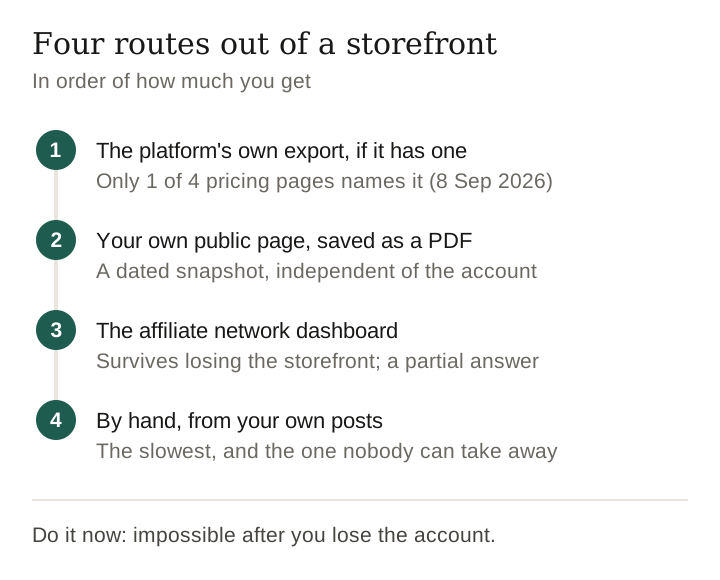
Four routes out, in order of how much you get
1. The platform’s own export, if it has one
Check the pricing page and the help centre, in that order. On the four pricing pages we read on 8 September 2026, only Linktree names data export, listed as “Advanced analytics & data export” on Premium. Komi’s feature comparison has no export row at all; Beacons and Later do not name export on theirs. That silence is not proof there is no export — several companies document data downloads in their help centres without selling them on the pricing page. It does tell you that nobody treats it as a reason to upgrade, which is why you should find out before you need it rather than during a migration.
2. Your own public page, read as a document
A link-in-bio or storefront page is public by design. Everything on it — titles, images, destinations — is already being served to anyone who opens it, including you. Open your own page, use your browser’s save or print-to-PDF, and you have a dated snapshot in thirty seconds. It is not structured data, but it is a record that exists independently of the account, which is the whole point.
For a structured version, most browsers will let you copy the page and paste it into a spreadsheet, which usually preserves the link targets behind the text. Paste into a plain-text editor first if you want to see what you actually got.
3. The network dashboard, for the links themselves
If your links come from an affiliate network rather than being generated by the storefront tool, the network holds its own copy of every link you created and usually exports them. That route survives losing the storefront entirely. It will not tell you which post or which page a link sat on, so it is a partial answer — but it is a partial answer held by a different company, which is exactly the property you want in a backup.
4. By hand, from your own posts
The slowest route and the one nobody can take away. Work backwards through your own feed, record what you linked, and stop pretending you will do all of it in one sitting. Twenty links an evening clears a substantial back catalogue inside a fortnight, and the ordering matters more than the speed: start with the posts that still get traffic.
Keep reading
The legal backstop, described not advised
Where a platform has no export button, data protection law is sometimes a route. We are describing two published frameworks, not advising you, and we are not lawyers.
- GDPR Article 20, data portability. For people the regulation covers, it establishes a right to receive personal data concerning you “in a structured, commonly used and machine-readable format” and to transmit it to another controller. The scope is personal data you provided, not everything a platform holds about your account, and the practical result varies by company.
- The California Consumer Privacy Act. California’s Attorney General publishes the consumer rights the act creates, including a right to know what personal information a business collects and to request a copy. Again: the right attaches to personal information, and a link list may or may not be treated as that.
Two honest caveats. First, these are rights over personal data, and it is entirely arguable that the list of products you chose to recommend is business data rather than personal data — we do not know how any given company would answer, and we have not tested a request. Second, a legal route takes weeks. It is a backstop for a situation that has already gone wrong, not a substitute for a copy you made yourself while everything was fine.
Verify the export before you trust it
An export you have not opened is a belief, not a backup. Four checks, each under a minute:
- Open it in a plain-text editor, not just a spreadsheet. Spreadsheets hide what they have mangled — long URLs, leading zeros, anything that looks like a date.
- Find your longest link and confirm it is complete. Query strings are where truncation shows up first, and roughly seven links in ten have one.
- Count the rows against what is on your live page. A short export usually means one section did not come along.
- Pick three links at random and open them. If they redirect somewhere unexpected, the export stored the wrapper rather than the destination, and you have a list of somebody else’s redirects rather than a list of products.
How often, and what to do with it
Quarterly is enough for most catalogues, plus one immediately before any migration, plan change or account consolidation. Keep the last two, not just the newest, so that a corrupted export does not overwrite a good one. Store it somewhere that has nothing to do with the platform you exported it from — the failure you are insuring against is losing an account, and a backup inside that account is not a backup.
And add the one column no platform will give you: the date you last checked each link. That single column turns an export into a working document, because it tells you where to spend an hour.
Ours, on the same standard
This page is written to be useful to someone leaving us, which requires saying where we stand. We have no export feature, because we have no self-serve accounts to export from. We build a storefront only when a creator asks us for one, and it is published only with that creator’s written OK; nothing is built from a creator’s posts for public view before then. There is nothing locked behind a tier here, and there is also nothing to download — those are two different kinds of nothing, and only the second one is a defence. The checklist above is the standard we expect to be held to.
Frequently asked
Can you export your link-in-bio page?
It depends on the tool and often on the tier. Of four creator-tool pricing pages read on 8 September 2026, only Linktree names data export, and it sits on Premium at $30 a month billed annually. The others do not mention export on their pricing pages, which is not proof it does not exist.
What should a storefront export contain?
The unwrapped destination URL, the retailer and product name in words, your own label, the date added and the date last checked. Click totals are the field exports most reliably include and the least useful for rebuilding.
How do you back up a storefront with no export button?
Save your own public page as a document or PDF for a dated snapshot, export the links from your affiliate network dashboard where they came from one, and work backwards through your own posts for anything neither covers. Keep the copy somewhere unconnected to the platform.
Does data protection law give you a right to your storefront data?
GDPR Article 20 establishes a right to receive personal data in a structured, machine-readable format, and California's CCPA gives a right to request a copy of personal information a business holds. Whether a list of products you chose counts as personal data is arguable, we have not tested a request, and this is a description rather than legal advice.
How often should you export?
Quarterly, plus once immediately before any migration or plan change. Keep the previous copy as well as the newest so a bad export cannot overwrite a good one.
Sources and method
Pricing-page facts were read from each company’s own public pricing page, fetched on 8 September 2026. The legal frameworks are described from the published text of GDPR Article 20 and the California Attorney General’s CCPA page. The URL and condition figures come from that 8 September 2026 pull.
The seed list ships with the page. A method you cannot repeat is not a method. The 24 keyword seeds behind every figure here were: vintage denim jacket, leather handbag, running shoes, hiking boots, wool scarf, gold necklace, vinyl record, vhs tape, trucker hat, mini skirt, platform sandals, sunglasses, air fryer, electric kettle, cordless drill, office chair, dog bed, coffee mug, throw pillow, table lamp, yoga mat, bluetooth speaker, hardcover book, board game. Scope: root shoppingProducts, arguments keywords and advertiserCountries:["US"], four pages of 100 rows per seed, deduplicated on advertiser + title + destination URL, then post-filtered on each row’s own targetCountry. Asking price is salePrice where the row carries one and price otherwise. Peer-to-peer asks of $500 and over and repeated-digit asks are dropped as seller placeholders. No totalCount is quoted: on a keyword pull the API OR-matches the words, so the count is not coherent.
Keep reading
How this page was made. Drafted with AI (Claude); not yet independently re-checked. How we work