LinkToLooks · Guides · Creator Desk
Creator Desk
What to check before you give a tool your Instagram login
Nineteen Instagram permissions exist, and a tool should ask only for the ones its features use. Here is what each one lets an app do, read from Meta’s own reference on 8 September 2026.
Part of: Instagram for creators
The short version. A tool that wants your Instagram username and password is not using Meta’s API, because Meta’s API does not work that way. A tool doing it properly sends you to a Meta consent screen listing named permissions, and Meta’s own documentation says you can “grant or deny the requested permissions or any subset of them”. Nineteen Instagram permissions exist. Meta tells developers to “only select permissions that your app needs to function as intended”. The gap between what a tool needs and what it asks for is the thing to check.
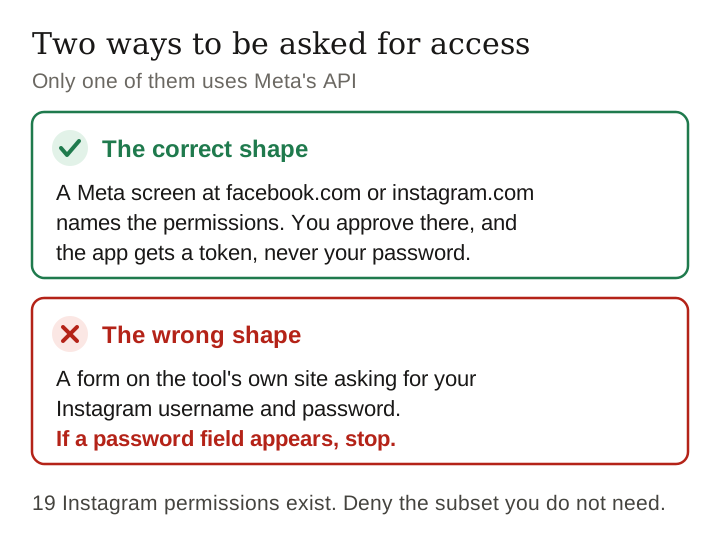
Two ways to be asked, and one of them is wrong
There are exactly two shapes this request comes in, and telling them apart takes two seconds.
The correct shape. You click connect, you land on a Meta-hosted screen at a facebook.com or instagram.com address, and that screen names the permissions the app is asking for. You approve there, Meta issues the app a token, and the app never sees your password. Meta’s permissions reference lists five documented routes for this: Facebook Login, Facebook Login for Business, Instagram API with Facebook Login for Business, Instagram API with Business Login for Instagram, and Meta Business Manager.
The wrong shape. A form on the tool’s own site asking for your Instagram username and password. There is no legitimate API route that needs them. A tool collecting them is either logging in as you through the front door — which is not something you can scope, audit or revoke per-feature — or storing a credential it should never hold. This is the single check on this page that is worth more than all the others: if a password field appears, stop.
Last verified 10 October 2026 against Meta’s published permissions reference, read in full
The 19 Instagram permissions, and what each one buys
Read from Meta’s Permissions Reference on 8 September 2026. These are the permission names that appear on a consent screen, and the descriptions are Meta’s own, condensed. The grouping into “reads”, “writes” and “reaches other people” is ours, because it is the distinction that actually matters and Meta’s alphabetical list hides it.
Reads your account
| Permission | What Meta says it allows |
|---|---|
instagram_business_basic | Read an Instagram business account profile’s info and media — basic metadata such as username and ID. Three other permissions, the instagram_business_ publishing, comments and messages scopes, depend on this one. |
instagram_basic | The Facebook Login counterpart, still listed, and the dependency named by most of the other Instagram permissions, including the insight and shopping ones. |
instagram_manage_insights | Get metadata, data insights and story insights of an Instagram business account. Meta adds that an app holding it “can also discover and read the profile info and media of other business profiles”. |
instagram_manage_events, instagram_manage_upcoming_events | instagram_manage_events logs events such as purchases, add-to-carts and leads on the account and sends that activity to Meta for ads targeting and reporting; instagram_manage_upcoming_events reads, creates and updates upcoming events. Both write as well as read. |
The insights line is the one worth pausing on. A permission you grant so that a dashboard can show you your own reach also lets that app read other business profiles. That is documented, it is not a loophole, and it is not what most people think they are approving.
Writes to your account
| Permission | What Meta says it allows |
|---|---|
instagram_business_content_publish, instagram_content_publish | Create organic feed photo and video posts on behalf of the account. This is the permission that lets a tool post as you. |
instagram_manage_contents | Delete posts, stories and reels on behalf of the account. |
instagram_business_manage_comments, instagram_manage_comments | Manage comments on behalf of the account. |
instagram_manage_engagement | Publish or delete a Like on posts, reels and comments on behalf of the account. |
instagram_shopping_tag_products | Check eligibility for product tagging, get catalogs and products, tag media with product tags, manage existing product tags and appeal product rejections. |
If a tool only builds you a link page, it does not need any row in this table. Publishing permission is for schedulers. Product-tagging permission is for tools that put shoppable tags on your posts. A link-in-bio tool asking to publish is asking for more than its job requires.
Reaches other people
| Permission | What Meta says it allows |
|---|---|
instagram_business_manage_messages, instagram_manage_messages | Access messages on an Instagram professional account: view, manage and respond to messages, and use third-party CRM tools to manage them. |
instagram_branded_content_creator, instagram_branded_content_brand, instagram_branded_content_ads_brand | Branded-content tagging and the ads built on it, from the creator side and the brand side. |
instagram_creator_marketplace_discovery, instagram_creator_marketplace_messaging | Discovery and messaging inside Meta’s creator marketplace. |
The DM permissions are the ones to be slowest about. Messages are the only private part of an Instagram account that contains other people’s words. Granting an app the ability to read and respond to them extends your decision to everyone who has ever messaged you, and they did not get a consent screen.
The dependency chain: one scope drags in others
Meta lists a “Dependencies” line under each permission, and this is where the consent screen gets longer than you expected. instagram_manage_insights depends on instagram_basic, pages_read_engagement and pages_show_list. So does instagram_shopping_tag_products. An Instagram professional account connected to a Facebook Page pulls Page permissions into an Instagram request, because that is how the accounts are joined underneath.
What this means in practice: when you see Facebook Page permissions on a screen you thought was about Instagram, that is usually the dependency chain rather than overreach. It is still worth checking which Instagram permission required them, because if none of the ones you actually want has a Page dependency, the Page permissions are being asked for on their own account.
A defect in Meta’s own reference, found while reading it
Reading the whole page rather than searching it turned up something worth reporting, because it affects anyone trying to do exactly what this article recommends.
The entry for instagram_business_manage_comments carries the wrong description. The text under it is, word for word, the description of instagram_business_content_publish: it says the permission “allows an app to create organic feed photo and video posts” for a business user. The App Review guidance immediately below it is correct and refers to managing comments, so the entry contradicts itself within a few lines.
Checked 8 September 2026 on the live page. We are not reporting it as a security problem, because it is not one — it is a copy-paste error in a reference document. We are reporting it because the canonical source a careful creator would consult currently describes one permission using another permission’s text, and a person doing their homework properly would come away with a wrong idea about what they were approving. If it has been fixed by the time you read this, good.
Keep reading
The 90-day rule almost nobody knows about
One line in Meta’s reference is worth more to a creator than most security advice: if an app does not use a permission for 90 days, usually because the user is inactive, “your app user must regrant your app that permission.”
Two consequences, and they pull in opposite directions.
- It limits the damage of forgetting. A tool you tried once and abandoned loses unused permissions on a timer, without you doing anything. That is a real protection and it is automatic.
- It also means a working tool goes quiet without warning. If a scheduler stops posting or a dashboard stops updating after a break, a lapsed permission is a likelier explanation than a bug, and the fix is to reconnect rather than to reinstall.
The rule is about the app not using a permission, not about you not using the app, so an active tool holding a permission it never exercises can lose that one while keeping the others.
The checklist, in the order you should run it
- Is there a password field? If yes, stop. Nothing below this line matters.
- Read the permission names on the consent screen against the tables above. Match each one to something the tool visibly does. A permission you cannot map to a feature is a permission to ask about.
- Deny the subset you do not need. Meta states that an app user “can grant or deny the requested permissions or any subset of them”. Some tools will then refuse to work, which is itself information.
- Treat messaging and publishing as separate decisions from reading. Reading is about you; those two are about other people and about your feed.
- Write down the date and the tool. A one-line note is the only record you will have when you later want to know what has access. The 90-day expiry helps, but it does not cover a tool you keep using.
- Review the connected-apps list in your own account settings periodically and remove what you no longer use. We are deliberately not giving you a click path for this — see the note at the end.
What we ask for, and what we do with it
We are one of the tools this page is about, so the same standard applies. What LinkToLooks actually does today: we build a storefront only when a creator asks us to, and it is published only with that creator’s written OK. There is no self-serve signup, and the request form on our site is a request rather than an account. If we ever ask for a connection, it should be assessed with the same checklist above, and you should hold us to it.
Frequently asked
Should you give a tool your Instagram password?
No. Meta's documented routes for third-party access are all token-based: the app sends you to a Meta consent screen, you approve named permissions, and the app receives a token rather than your credentials. A form asking for your Instagram username and password is not using that route.
How many Instagram permissions are there?
Nineteen permission names beginning instagram_ appear in Meta's Permissions Reference as read on 8 September 2026, covering profile reads, insights, publishing, comments, messaging, branded content, creator marketplace and product tagging. Meta tells developers to select only the permissions their app needs.
Can you approve only some of the permissions an app asks for?
Meta's reference states that app users can grant or deny the requested permissions or any subset of them. Whether the app still works after a partial grant is up to the app, and a tool that breaks when you deny an unrelated permission has told you something useful.
Do Instagram permissions expire?
Meta states that if an app does not use a permission for 90 days, usually due to user inactivity, the user must grant that permission again. That limits the reach of a tool you abandoned, and it also explains a working tool that goes quiet after a break.
Which Instagram permission lets an app read my DMs?
instagram_business_manage_messages, and the older instagram_manage_messages. Meta describes them as allowing an app to view, manage and respond to messages on a professional account, including through third-party CRM tools.
Sources and what we could not verify
Everything quoted above comes from Meta’s Permissions Reference for Meta Technologies APIs, read in full on 8 September 2026. Permission names and descriptions are taken from that page; the grouping and the commentary are ours.
What we could not verify. We could not reach a working Instagram Help Centre article on removing a third-party app’s access: the article we tried returned “This Page Isn’t Available” on 8 September 2026. So this page gives you no click path for revoking access, because a wrong click path is worse than none. Find the connected-apps or website-permissions screen inside your own account settings, where it will be current, rather than following anyone’s written steps — including ours. Separately, Meta properties are known to serve different documents to different clients, so a plain scripted request to the developer docs returned an error where a browser returned the page; the reading above was done in a browser.
Keep reading
How this page was made. Researched and drafted with AI (Claude); checked by a separate automated pass on 12 October 2026. How we work