LinkToLooks · Guides · Creator Desk
Creator Desk
QR codes solve a printing problem, not an attribution problem
Four things the square cannot do, and the measured reason to shorten a URL before you encode it.
Part of: For creators
A QR code solves a print problem: it moves a URL from paper to a phone without anyone typing. It does not solve an attribution problem, and it is not a link-in-bio replacement.
The distinction matters because the two are constantly conflated. Everything a QR code gives you comes from the URL inside it. If that URL carries no SubID, the scan is as anonymous as any other click — the square adds nothing.
The four things a QR code cannot do
1. It cannot tell you who scanned
A scan is an HTTP request from a phone browser. It carries no identity, no platform, no post. Everything you will ever know about it has to be encoded in the URL before you print it.
2. It cannot distinguish two placements on its own
The same code on a business card and on a pop-up sign produces identical requests. If you want to tell them apart you need two codes with two different SubIDs, which is free to do and almost never done.
3. It cannot be edited once it is printed
This is the failure that actually costs money. A static code pointing at a retailer URL is permanent, and retailer URLs are not. The only fix is to point it at a redirect you control, which brings the whole cloaking trade-off with it.
4. It cannot make a bad destination good
A scan lands on a phone browser, often in poor light, usually standing up. If the destination is a slow product page behind a cookie wall, the code has faithfully delivered someone to a bad experience.

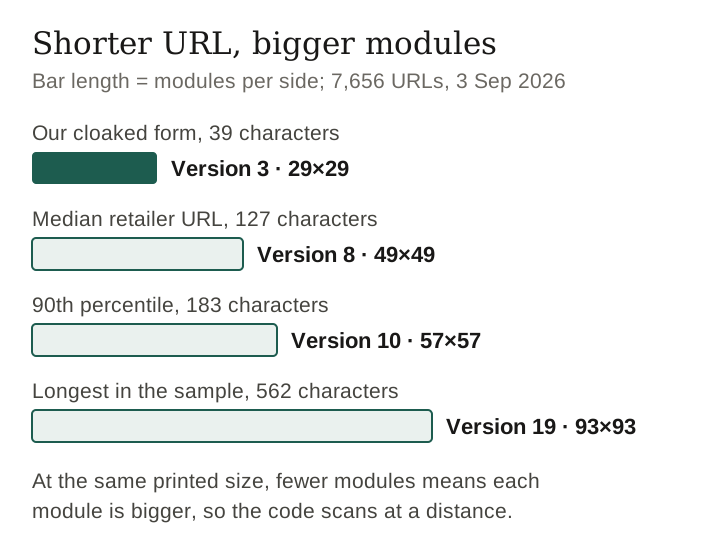
What your URL length does to the square
This is measurable and almost nobody writes it down. QR codes are sized in versions: version 1 is 21×21 modules, and each version adds four modules per side. A longer URL needs a higher version, and a higher version means smaller modules at the same printed size — which is the thing that decides whether a phone reads it from across a room.
We pulled 7,656 unique live product URLs on 3 September 2026 and computed the smallest QR version each would need in byte mode at error-correction level M. Byte mode is the right mode here: QR’s compact alphanumeric mode has no lowercase letters, and all 7,656 of these URLs contain lowercase.
| URL | Characters | Smallest QR version | Grid |
|---|---|---|---|
| Shortest in the sample | 34 | Version 3 | 29×29 |
| Median retailer URL | 127 | Version 8 | 49×49 |
| 90th percentile | 183 | Version 10 | 57×57 |
| Longest in the sample | 562 | Version 19 | 93×93 |
| Our cloaked form | 39 | Version 3 | 29×29 |
Read the first and last rows together. Shortening the URL takes the grid from 49×49 to 29×29 at the median, and from 93×93 at the tail. At a fixed printed size, fewer modules means each module is physically bigger, and a bigger module is the entire difference between a code that scans from two metres and one that does not scan at all on a cheap camera.
The practical rule that falls out of it: if a QR code is going on anything printed, shorten the URL first. Not for tidiness — for legibility.
Keep reading
Where they genuinely win
The case against QR codes for creators is really a case against using them where a tappable link already exists. Where no tappable link exists, they are the only option there is:
- Anything printed. Packaging inserts, market stalls, event signage, a card in a parcel. The alternative is asking someone to type 79 characters.
- On screen, to a second screen. A code shown on a stream or a slide moves a viewer from a device they cannot click on to one they can.
- Where the audience is standing up. A shelf talker or a poster catches the moment of interest at the exact place it happens.
In all three the code is doing the one job it is good at: crossing the gap from an untappable surface to a phone. That is a real job and nothing else does it.
Building one that survives
- Point it at a redirect you own, never directly at a retailer URL. Printed things outlive product pages.
- Put a SubID in the destination URL before you generate the code, and a different one per placement. This is the step that turns a scan into information.
- Shorten before you encode — see the table above.
- Print the URL underneath in readable text. Some people will not scan, some cameras will not focus, and a legible fallback costs one line.
- Test it on a cheap phone, in bad light, at the distance people will actually stand. Not on your own phone, at your desk, from thirty centimetres.
- Keep the quiet zone. The blank margin around the code is part of the code; designers crop it and the code stops working.
Frequently asked
Can a QR code track who scanned it?
No. A scan is an ordinary web request carrying no identity. Anything you learn has to be encoded in the URL before printing, usually as a SubID.
Should a QR code go straight to the retailer?
Not on anything printed. Retailer URLs change and a printed code cannot. Point it at a redirect you control so the destination stays editable.
Does the URL length change the QR code?
Yes, directly. In byte mode at error-correction level M, a 127-character URL needs a 49×49 grid and a 39-character one needs 29×29. At the same printed size the shorter URL gives you physically larger modules, which is what makes a code scan at a distance.
Do QR codes replace a link-in-bio page?
No. They solve the opposite problem. A link-in-bio page exists because a platform gives you one tappable slot; a QR code exists because a surface gives you none.
Do I need to disclose an affiliate link behind a QR code?
Yes. The disclosure belongs next to the code, where someone decides whether to scan — not on the page they land on afterwards.
Method and scope
- URL lengths: 7,656 unique live product URLs across 117 retailer domains, pulled 3 September 2026 from twenty unrelated seed categories.
- QR versions are computed from the published capacity table in ISO/IEC 18004 for byte (8-bit) mode at error-correction level M, and grid size from the standard formula 17 + 4 × version. Higher error correction, or a URL containing bytes above ASCII, needs a larger version than shown.
- Not measured: scan rates, conversion, or how often a printed code is used. We have no such data, and neither does anyone publishing a scan-rate benchmark without naming its sample.
- We hold no affiliate approvals and have not run a printed campaign. This page is about what the format can and cannot do.
Keep reading
Last verified 3 September 2026 against 7,656 unique live product URLs sized against the ISO/IEC 18004 byte-mode capacity table
How this page was made. Drafted with AI (Claude); not yet independently re-checked. How we work