LinkToLooks · Guides · Creator Desk
Creator Desk
What a crawler actually reads on a creator page
It reads the HTML your server sent and nothing else — which is why a page can look perfect in a browser and be nearly empty to a crawler.
Part of: For creators
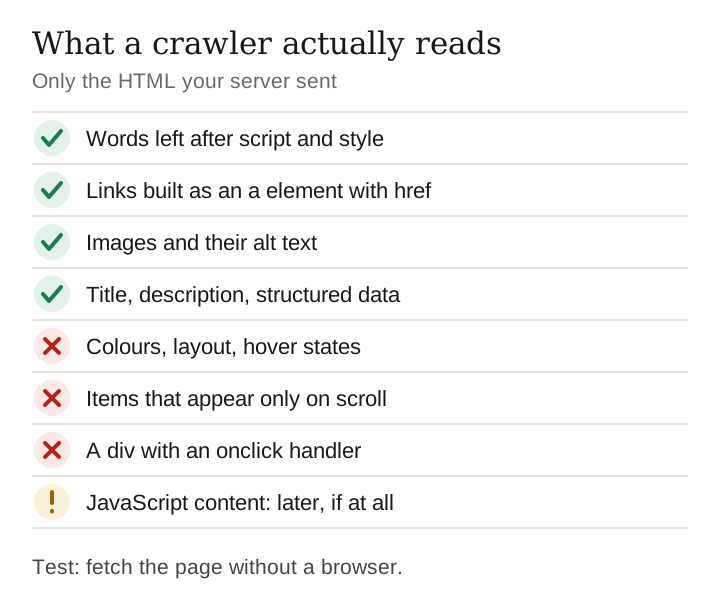
A crawler reads the HTML your server sends and nothing else. Not what the page looks like, not what appears after JavaScript runs, not what loads when you scroll. Google does run JavaScript, but as a separate rendering step: its own documentation says a page can wait in the rendering queue for a few seconds or longer, and that server-side rendering is still a good idea because not every bot can run JavaScript.
So the test that matters is simple: fetch your own page without a browser and read what comes back. If the product names on screen are missing from the source, everything a crawler needs is being assembled after the fetch, and no amount of design work will make it visible.
The fields a crawler actually records
Rather than describe a crawler in the abstract, here is the field list a basic site crawler stores for every URL. A commercial crawler stores more, but nothing here is exotic and every field is read from the raw response.
| Field | Where it comes from | What an empty value means |
|---|---|---|
| HTTP status | the response line | anything other than 200 and the rest is moot |
| canonical | link rel=canonical | the crawler picks a canonical for you |
| title | the title element | no title text to show in a result |
| meta description | meta name=description | the engine writes its own snippet from the body |
| h1 count | count of h1 tags | zero or several, and the page topic is ambiguous |
| words | text after script and style are removed | the page has nothing to be about |
| images and images without alt | img tags | images that cannot be understood or ranked |
| internal and external links | a href values | nothing to crawl next, no outward signal |
| Open Graph and Twitter tags | meta tags | no controlled preview when shared |
| structured data types | application/ld+json | no machine-readable summary of the page |
| indexable | meta robots and X-Robots-Tag headers | the page opted itself out |
Notice what is absent from that list. No colours, no layout, no animation, no hover state, nothing about how it feels to use. The entire experience a creator spends their effort on is invisible here. What is visible is text, links, images with alt text, and a handful of declarations in the head.
Measure your own pages the same way
You can take these readings on your own site in a few minutes. Pick four pages that do different jobs: a post or article, your storefront or product grid, a landing page and your home page.
- Fetch each page without a browser. A command-line request such as
curl -A "Mozilla/5.0 (compatible; Googlebot/2.1; +http://www.google.com/bot.html)" https://yoursite.com/page/returns the HTML the server sends, with no JavaScript run. That user agent string is one Google publishes for Googlebot. - Strip script and style, then count the words. That is roughly the text a crawler has to work with before any rendering.
- Count links, images and structured-data blocks in the same source:
href=,<imgandapplication/ld+json. - Compare each count with what you see on screen. A page that shows forty products and returns a few dozen words has a grid built in the browser.
The row to watch is the one where the screen and the source disagree most. On a creator site the likeliest candidate is the storefront or product grid, because grids are often filled in by a script after the page loads. The fix is to render the same grid on the server; nothing about the design has to change.
Keep reading on getting found
The patterns that render empty
Four shapes come up repeatedly in creator pages, and all four look perfect in a browser.
The product grid built in the browser
- The page ships an empty container and a script that fills it.
- Googlebot does render JavaScript, but on its own schedule and budget, and a second pass is never guaranteed for a low-authority site.
- Symptom: the source contains no product names you can see on screen.
Text baked into images
- A graphic containing the words is zero words to a crawler.
- Alt text is the only route back, and it is a sentence, not a paragraph.
- Symptom: a beautiful page with a word count in the low dozens.
Infinite scroll with no paginated URLs
- Items after the first screen exist only after a scroll event.
- There is no URL for page two, so there is nothing to crawl; Google’s own guidance is to give each chunk its own persistent URL.
- Symptom: the crawler records the first eight products of two hundred.
A link that is not a link
- A clickable element built from a div and an onclick handler navigates a person and nobody else.
- Crawlers follow
a href. That is the whole mechanism. - Symptom: pages that exist, work, and are reachable by nothing.
Our editorial judgment: of the four, the third is the one creators lose most to, because it is invisible even when you check. The page looks complete, you scroll and it fills, and the crawler took eight products and left.
One page, two documents: user agents change the answer
Worth knowing before you trust any check you run, including ours. We requested instagram.com/robots.txt twice on 4 September 2026, seconds apart, changing nothing but the user agent string.
| User agent sent | Content type returned | Bytes |
|---|---|---|
| Chrome on Windows | text/html; charset="utf-8" | 616,296 |
| Googlebot | text/plain; charset=utf-8 | 6,258 |
The same URL served a 600KB HTML page to a browser and a 6KB text file to a crawler. Neither response is wrong; the site is deciding what you are and answering accordingly. The lesson for anyone auditing their own page is that what you see in your browser is one of several possible answers, and the one that matters for search is the one sent to a crawler.
Check your own page in three minutes, no tools
- View source, not inspect. Inspect element shows the rendered result. View source shows what was actually sent. On a desktop browser it is Ctrl+U, or prefix the address with
view-source:. - Search for one product name you can see on screen. Present in the source, the crawler has it. Absent, it does not.
- Count your links. Search the source for
href=. If your storefront shows forty products and the source has six links, thirty-four products are not reachable. - Check the title and description. One
title, onemeta name="description", and both describing this page rather than your whole site. - Look for a noindex. Search for
noindex. Many link-in-bio tools ship it by default, which is a defensible choice they rarely tell you about. - Use Search Console if the site is yours. The URL Inspection tool shows the crawled HTML rather than your browser’s version, which settles the argument.
That sequence is the whole audit for a single page, and it needs no subscription. What it will not tell you is whether the page deserves to rank once it is readable. Those are separate problems and this is the cheaper one.
Frequently asked
Does Google run JavaScript?
Yes, in a second pass, on its own schedule. Relying on it means depending on a queue you cannot see, with no guarantee of when or whether your page reaches the front of it. Server-rendered content has no such dependency.
How many words does a page need?
There is no threshold, and any specific number you are quoted is invented. The useful test is whether the words a crawler receives actually describe what the page is for. A 200-word page that says what it is beats a 2,000-word page assembled after the fetch.
Do alt attributes matter for ranking?
They are the only text a crawler gets from an image, so on an image-led page they are a large share of everything you sent. Write them describing the object, not stuffed with keywords.
My link-in-bio page has almost no source text. Is that fatal?
Not fatal, but it means the page cannot earn search traffic on its own. If that is fine because the page exists to catch people who already know you, nothing is broken. If you expected search traffic from it, this is why it never arrived.
Sources and scope
The Instagram comparison is two fetches of one URL on 4 September 2026, differing only in user agent. The field list describes what a basic crawler reads from a raw response; Googlebot records a great deal more, but the reading step is the same.
- Google Search Central, Understand the JavaScript SEO basics — crawling, rendering and indexing as separate phases; the rendering queue; server-side or pre-rendering still recommended.
- Google Search Central, Link best practices for Google — Google can generally crawl a link only if it is an
aelement with anhrefattribute. - Google Search Central, Fix lazy-loaded content — Google Search does not interact with the page; give each infinite-scroll chunk its own URL.
- Google Search Central, Google’s common crawlers — the Googlebot user agent strings.
- Search Console Help, URL Inspection tool — View crawled page shows the HTML Google received.
Keep reading
Google documentation cited on this page read 29 September 2026.
How this page was made. Drafted with AI (Claude); not yet independently re-checked. How we work