LinkToLooks · Guides · Creator Desk
Creator Desk
Which YouTube surfaces can carry an affiliate link?
Two of the four surfaces this page covers sit behind the Partner Programme, and they are the two YouTube attaches to playback itself.
Part of: For creators
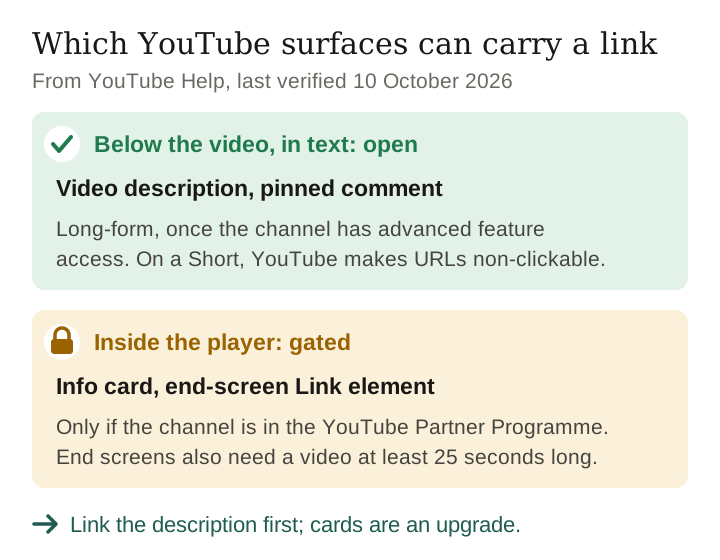
A YouTube affiliate link can go in a long-form video's description or a pinned comment once the channel has advanced feature access; in a Short's description or comments, YouTube makes URLs non-clickable. It can go in an info card or an end screen only if the channel is in the YouTube Partner Programme. YouTube's own help pages state the gate twice, in almost identical words. Both begin ‘If you're in the YouTube Partner Program’; the info card then ‘allows you to link to an external website’, and on end screens ‘you can link to an external website.’
So the two surfaces YouTube attaches to playback — the card teaser and the end screen — are exactly the two a channel outside the Partner Programme cannot use for an external link. Checked 3 September 2026.
The surface matrix
Every row below comes from a YouTube help page; the description and pinned-comment rows were corrected against YouTube Help on 10 October 2026. Where the page says nothing, this table says so rather than guessing.
| Surface | Can carry an external link? | What YouTube requires |
|---|---|---|
| Video description | Yes on long-form; not on a Short | No Partner Programme requirement, but clickable links need advanced feature access; YouTube makes URLs in Shorts descriptions non-clickable. |
| Pinned comment | Yes on long-form; not on a Short | No Partner Programme requirement, but pinning a comment needs advanced feature access; YouTube makes URLs in Shorts comments non-clickable. |
| Info card | Only in the Partner Programme | In the YouTube Partner Program, the card ‘allows you to link to an external website to share with your audience.’ |
| End screen — Link element | Only in the Partner Programme | Listed as one of five element types; the Link element is the one carrying the Partner Programme condition. |
| End screen — Video, Playlist, Subscribe, Channel | No external link | Available without the Partner Programme, but they point inside YouTube. |
| Paid-promotion disclosure checkbox | Not a link | A declaration, not a surface: ‘check the box next to “My video contains paid promotion…”’ |
The pattern is worth naming. YouTube gates the surfaces it renders inside the player and leaves the surfaces that are really just text — the description, the comment field — open, on long-form video, to any channel with advanced feature access. That is a coherent policy, and it has an awkward consequence for a creator building an audience: the placements that are easiest for a viewer to act on are the ones you get last.
What the Partner Programme gate actually costs
Read the two quoted sentences together and the shape of the restriction is clear. It is not that a small channel cannot post affiliate links. It is that a small channel can only post them below the video, in text a viewer has to go looking for.
- The description works on any long-form video once the channel has advanced feature access, but it is collapsed by default on computers and on mobile, and only its first few lines show until a viewer taps ‘more’. Where the link sits in the description is a real decision, and we have written it up separately.
- The pinned comment works on long-form video once the channel has advanced feature access (on mobile, viewers must expand the comments to see it), and has one genuine advantage over the description: you can edit it after publishing without touching the video's metadata.
- Cards and end-screen links do not work until the Partner Programme accepts you. Any advice that opens with ‘add a card’ is written for a channel that is already past that point.
Keep reading
End screens have mechanical limits too
Even inside the Partner Programme, the end screen is a narrower instrument than it looks. YouTube's own constraints, with its key words quoted:
- ‘Your video has to be at least 25 seconds long to have an end screen.’
- ‘End screens can be added to the last 5–20 seconds of a video.’
- ‘You can add up to four elements to your end screen’ on a standard 16:9 video; other aspect ratios may allow fewer.
- The five element types are Video, Playlist, Subscribe, Channel and Link.
- ‘End screens aren't available for videos set as made for kids’, nor in the YouTube music app, on mobile web, or for Flash or 360 videos.
Three of those matter commercially. The 25-second minimum rules out any video shorter than that outright. The four-element cap means every link you add competes with Subscribe and with your next video for the same four slots. And ‘made for kids’ removes end screens entirely, which is a hard constraint for anyone publishing toy, craft or family content and setting the audience flag honestly.
Disclosure is a separate obligation
None of the above is about disclosure, and the two get run together constantly. YouTube's Branded Content Policies are explicit that the platform's checkbox does not discharge a legal duty: you and your brand partners are, in its words, ‘responsible for understanding and complying with all applicable legal requirements’, and ‘you are ultimately responsible for ensuring your disclosure is clear and prominent’.
What the checkbox does do is documented: ‘we automatically show viewers a disclosure message’, which YouTube says will ‘appear at the start of your video’. A label at the start of a twelve-minute review is not the same thing as a disclosure a viewer sees when they reach the link, which is the point our disclosure guide argues at length.
The paid-promotion article YouTube replaced by 8 September 2026 also limited sponsor title cards and end cards; neither the current Branded Content Policies nor the how-to article now at its address restates those limits.
A working order of operations
- Put the link in the description, high. On long-form video it works for any channel with advanced feature access, with no Partner Programme requirement.
- Pin a comment with the same link. Editable later; useful when a product sells out and the description is buried in a template.
- Say it out loud in the video. No platform gates speech, and it reaches a viewer on whatever screen they watch.
- Add cards and end-screen links when the Partner Programme lets you, and treat them as an upgrade rather than a plan.
- Disclose independently of the checkbox. Tick it, and also write the disclosure where the reader meets the link.
What we could not verify
- Whether pinned comments carry any link restriction beyond the documented ones. YouTube documents these: pinning a comment and making its links clickable both need advanced feature access, and URLs in Shorts comments are non-clickable. Absence of any further documented rule is not proof there is none.
- Current Partner Programme thresholds. They are outside what we checked on this date. Take them from YouTube directly rather than from any article, including this one.
- Anything about click-through. We have no click data for any YouTube surface, and the only sourced figure we found is YouTube's own: in an experiment, videos with product tags and description links ‘saw 23% more clicks on products than videos with description links alone’. Your own YouTube Analytics also reports an ‘End screen element click rate’.
- How this behaves on connected TVs. The end-screen exclusions list names mobile web, the music app and 360 video; it does not settle television playback, so we are not describing it.
Frequently asked
Can you put affiliate links on YouTube?
Yes, in a long-form video's description and comments, once your channel has advanced feature access; YouTube makes URLs in Shorts descriptions and comments non-clickable. Info cards and end-screen links to external sites require YouTube Partner Programme membership.
Do I need to be monetised to post affiliate links?
Not for description links. You do need Partner Programme membership for the two in-player link surfaces, which is a different question from whether ads run on your videos.
Does the paid promotion checkbox count as my disclosure?
YouTube says creators remain responsible for their own legal obligations. The checkbox triggers a disclosure message at the start of the video; treat it as a platform feature, not a compliance step.
Can a Short have an end screen?
A video under 25 seconds cannot have one, by YouTube's stated minimum. Longer Shorts are a separate question we look at in the Shorts comparison.
How many links should a description carry?
That is a caption-design question rather than a policy one. Our page on link counts argues it from truncation points rather than from click data we do not have.
Sources
- Add end screens to videos — YouTube Help. Read 3 September 2026 for the 25-second minimum, the 5–20 second window, the four-element cap, the element list and the exclusions.
- YouTube Help: linking an info card to an external website. Read 3 September 2026 for the info-card Partner Programme condition.
- Add paid product placements, sponsorships and endorsements — YouTube Help. Read 3 September 2026 for the checkbox, the 10-second automatic message, the title-card and end-card constraints and the jurisdiction sentence. By 8 September 2026 that address carried a how-to article, ‘Add branded content restrictions & disclosure labels’, and the policy moved to YouTube Branded Content Policies.
- Sharing links with your audiences and Learn about feature access for YouTube Creators — YouTube Help: non-clickable Shorts links, and the advanced-feature requirement for description links and pinned comments.
- Quotations are YouTube's wording, reproduced only as far as needed to state the rule accurately.
Keep reading
Last verified 10 October 2026 against three YouTube Help pages read: end screens, external link cards and paid product placements
How this page was made. Researched and drafted with AI (Claude); checked by a separate automated pass on 12 October 2026. How we work