LinkToLooks · Guides · Creator Desk
Creator Desk
Shorts or long-form: which carries a product link better?
Compared on the surfaces each format documents, not on conversion rates we could not find a source for.
Part of: For creators
On linkable surfaces alone, long-form wins, and the margin is documented rather than argued. A YouTube end screen requires a video ‘at least 25 seconds long’ and occupies the last 5–20 seconds of it. A Short can run up to three minutes, but YouTube's end-screen page never mentions Shorts, and even on its own terms any video under 25 seconds is excluded and an end screen in the last 20 seconds of a 30-second video is most of the video.
What we cannot tell you is which format earns more, because that needs click data. We have none. We could not find a published Shorts click-through rate with a primary source behind it. Checked 3 September 2026.
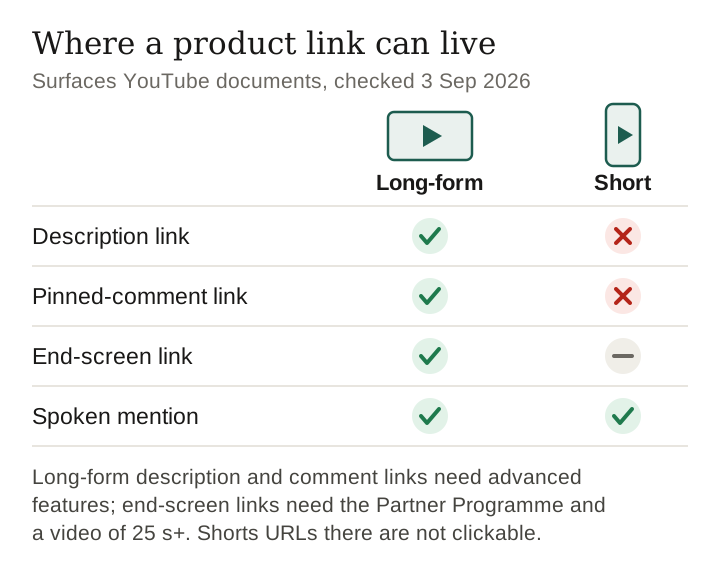
The surfaces, side by side
This comparison deliberately ignores audience, reach and the algorithm, because those are the parts nobody can evidence. What can be evidenced is which surfaces exist on each format, and YouTube documents that.
| Surface | Long-form | Short | Why |
|---|---|---|---|
| Description | Yes, with advanced feature access | No clickable URLs | YouTube makes URLs in Shorts descriptions non-clickable to reduce spam. |
| Pinned comment | Yes, with advanced feature access | No clickable URLs | Editable after publishing on both, but YouTube makes URLs in Shorts comments non-clickable. |
| End screen Link element | Partner Programme only | Not documented for Shorts; impossible under 25 seconds | ‘Your video has to be at least 25 seconds long to have an end screen.’ |
| End screen, any element | Last 5–20 seconds | Not documented for Shorts | Same stated window, applied to a 30-second video. |
| Info card | Partner Programme only | Not documented for Shorts | In the YouTube Partner Program, the card ‘allows you to link to an external website’. |
| Spoken mention | Yes | Yes | Ungated on both, and it reaches a viewer on any screen. |
Read down the ‘why’ column and the difference is not philosophical. Long-form can carry clickable links in its description, its comments and, inside the Partner Programme, its cards and end screen; a Short's description and comments cannot carry a clickable URL at all.
The 25-second arithmetic
Take YouTube's two stated end-screen constraints together and the consequence is mechanical:
- Under 25 seconds: no end screen at all. Not reduced, not smaller — ineligible.
- At 30 seconds: eligible, but the end screen window is the last 5 to 20 seconds, so up to two-thirds of the video is end screen.
- At three minutes, the maximum Short length, the same 20-second window is 11% of the video and the arithmetic stops being the problem.
- On a ten-minute review: 20 seconds is about 3%.
That is the whole structural argument, and it is worth more than any engagement claim because you can check it yourself in a minute.
Keep reading
The number nobody has
Search for a comparison of these two formats and you will find click-through rates quoted to one decimal place. We went looking for the source of one and did not find it. That is not a rhetorical point: a click-through rate for a link surface can only come from the platform publishing it, from a creator's own analytics (YouTube Analytics reports an ‘End screen element click rate’), or from an advertiser aggregating their own campaigns, and none of those appears behind the figures in circulation.
Our own position on this is uncomfortable and worth stating plainly: we hold no click data for any of these link surfaces. That is exactly why we will not hand you a number here. A creator who plans a content calendar around an unsourced conversion rate has planned around a rumour.
What you can do instead is measure your own. One SubID per format — one for Shorts, one for long-form — and after thirty posts your own dashboard has the comparison that no article can give you. It is your data, it reflects your audience, and it is the only version of this number that is true for you.
How to choose without click data
- Ask how the viewer will act. If the purchase needs a comparison — sizes, prices, two competing products — long-form gives you the description real estate and the in-player surfaces to support it.
- Ask how long the product will exist. A discontinued product makes a long review stale; short vertical video for the volatile things, long-form for the ones that will still be on sale next spring.
- Ask whether you are in the Partner Programme. If you are not, long-form still has two clickable surfaces — description and pinned comment, once your channel has advanced feature access — while a Short's description and comments carry no clickable URL at all.
- Ask what the audience flag is. Made-for-kids content has no end screens on either format, so a family channel should plan around the description from the start.
The case for doing both, in one order
The formats are not rivals for the same slot in a week. The sequence that uses each for what it is documented to do:
- Long-form first, once, per product family. It is the version that can carry an end-screen link and a clickable description link.
- Shorts as the pointers. Their description links are not clickable, but each can carry a clickable related-video link to the long video, and one long video can support many of them.
- The same pinned comment on both (on a Short it can name the product, but its URL will not be clickable), so when a product sells out you have one place per video to fix rather than a rewrite.
- One SubID per format, from the first post, so that in three months you are arguing from your own numbers instead of somebody's blog post.
Frequently asked
Can you put affiliate links on YouTube Shorts?
Not in the description or comments: YouTube says URLs in Shorts descriptions and comments are non-clickable, to reduce spam. A Short can carry a clickable related-video link to your own content, YouTube Shopping product tags if your channel is in that program, and one brand link on a reported brand deal. The end-screen link surface is not available to a Short under 25 seconds because YouTube requires a video to be at least that long to carry an end screen.
Do Shorts or long-form videos convert better?
We do not know, and we could not find a click-through figure for either with a primary source behind it. Measure it on your own channel with a separate SubID per format.
How long can a Short be?
Up to three minutes with the multi-segment camera, per YouTube's own Shorts page, read 3 September 2026.
Should I put the link in the first line of the description?
Placement is a real decision on both formats and we treat it separately in our YouTube description guide, which argues it from where the text is truncated rather than from click data.
Does the end screen work on every device?
No. YouTube states end screens are not available on mobile web, in the YouTube Music app, on Flash or 360 videos, or on videos set as made for kids.
Sources
- Add end screens to videos — YouTube Help, read 3 September 2026: the 25-second minimum, the 5–20 second window, the four-element cap and the exclusions.
- YouTube Shorts — YouTube Help, read 3 September 2026: Shorts up to three minutes with the multi-segment camera, 1080p maximum upload resolution.
- YouTube Help: linking an info card to an external website, read 3 September 2026 for the Partner Programme condition.
- Sharing links with your audiences, Add a related video to your YouTube Shorts, Add a link to a brand’s site to your Short and Learn about feature access — YouTube Help, read 10 October 2026: non-clickable Shorts description and comment URLs, the clickable alternatives, and the advanced-feature requirement.
- No click-through, view-through or conversion figure appears on this page, because we hold none and found none that was sourced.
Keep reading
Last verified 10 October 2026 against YouTube's end screens, Shorts and external-link help pages, each read on that date
How this page was made. Researched and drafted with AI (Claude); checked by a separate automated pass on 12 October 2026. How we work