LinkToLooks · Guides · Creator Desk
Creator Desk
Can you put affiliate links on Snapchat, and what does a link cost you in reach?
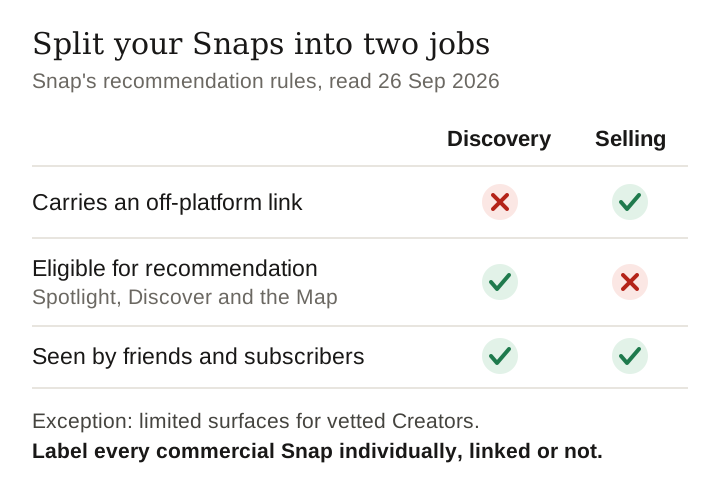
Snap is the one major platform that writes the reach rule down: a Snap carrying an off-platform link is not eligible for recommendation, so the real decision is which Snaps are for discovery and which are for selling.
Part of: For creators
Yes, you can link. You attach a URL to a Snap with the paper clip, and Creator Accounts can add a website to their Public Profile. Snap's Commercial Content Policy then requires you to identify the content as commercial and use its paid partnership tool.
The cost is published: Snap's recommendation guidelines list “Off-platform links” as not eligible for recommendation, except “on limited surfaces for vetted Creators”. A linked Snap reaches your friends and subscribers, not Spotlight's wider audience. Read on Snap's own pages, 26 September 2026.
Where a link can go
| Surface | Link? | What Snap's help centre says |
|---|---|---|
| A Snap (friends or public) | Yes | Paper clip on the Preview screen, paste or search a URL, “Attach to Snap”; viewers swipe up |
| Standard Public Profile | No website field | “Add a Website and Public Email” is not ticked for a standard Public Profile |
| Creator Account or Business Profile | Yes, one website | “Add a Website and Public Email to your Public Profile” is ticked |
| Chat | Yes | The + icon opens a drawer to send recent links, stories and content |
Snapchat Support articles “How do I attach a link to a Snap?” (updated 30 April 2026), “What features come with a Public Profile” (10 November 2025), “What features come with a Creator account” (15 June 2026), “What can I send in Chat” (24 August 2026). Update dates are Snap's own, read 26 September 2026.
The profile row is the one people miss. A plain Public Profile has nowhere to put a website at all; switching to a Creator Account is what adds the field. That makes the Creator Account the only place on Snapchat where a link can sit without costing a single Snap its distribution.
The reach rule Snap wrote down
Whether a platform quietly demotes posts with outbound links is one of the most argued questions in creator marketing, and on Instagram nobody outside Meta can answer it; our page on Instagram reach explains why. Snap is different. Its Content Guidelines for Recommendation Eligibility, under Quality, list these as not eligible for recommendation:
- Off-platform links. Snap adds that it prohibits redirections to social media, messaging or cloud-storage services, and that some off-platform links “may be eligible for recommendation, but only on limited surfaces for vetted Creators.”
- Promotion of accounts on other social or messaging apps, such as a username beside another app's logo.
- Commercial content that does not disclose its commercial nature (a separate section, Commercial Content).
“Recommendation” is the part of Snapchat that shows your Snap to people who do not already follow you: Spotlight, Discover and the Map, per the same guidelines. A Snap with a link is still delivered to your friends and subscribers; it just stops being eligible for strangers.
Our position: split your Snaps into two jobs. Discovery Snaps carry no link and aim at Spotlight. Selling Snaps carry the link and the label and are written for people who already subscribe. Mixing both jobs into one Snap gives up the reach and keeps the risk.
Keep reading
The paid partnership label
Snap's Commercial Content Policy (effective 2 July 2026) applies to content that “promotes, or advertises any brand, products, goods, or service”, your own brand or business included, and to content you were paid or given free gifts to post. Such content “must identify the commercial nature of the content, and any promoted brand”, and you “must also use Snap's paid partnership tool”.
Adding the label, per Snap's help article (updated 2 September 2025):
- On the Send To screen, select a public-facing destination: Public Story, Spotlight or Snap Map.
- Tap the three-dot menu, then Add Paid Partnership.
- Toggle Paid Partnership on.
Two details matter more than the steps. Disclosure is per Snap: the policy's own example says that if you post six commercial Snaps and disclose only the first, only the first is eligible for amplification beyond your Public Profile. And commercial content may appear in the For You section, so the disclosure has to make sense to someone who has never seen your other Snaps.
Snap's policy does not use the word “affiliate”. Our reading is that a commission is “monetary payment” for promoting a product, so an affiliate Snap is commercial content and takes the label. Snap's own example goes further than any other platform we read: a creator who makes and sells roller skates must label their own skates.
Four platforms, one affiliate link
We read the four platforms' own disclosure pages on the same evening. They do not agree, and a creator posting one product everywhere is working under four rule sets at once.
| Situation | Snapchat | Instagram / Threads (Meta) | Twitch |
|---|---|---|---|
| Post with an affiliate link | Not named; our reading: label | Label required, named explicitly | Tool not required when answering a chat question |
| Free product from a brand | Label | Label | Tool, if central to the stream |
| Borrowed product | Label | Label | Not addressed |
| Your own product | Label | No label | No tool |
| Bought it yourself, no deal | No label | No label | No tool |
| Does the platform label satisfy the law? | You remain responsible | You remain responsible | “Will not always be sufficient” |
Snap Commercial Content Policy; Instagram Help Center, “What is considered branded content”; Twitch Branded Content Guidelines. All read 26 September 2026.
The row to remember is the affiliate one. Meta names it; Twitch exempts one version of it; Snap is silent and its wording points to labelling. Labelling everywhere is the only setting that is correct on all three. Our pages on Twitch and Threads carry the detail for those platforms.
What you cannot promote, and the redirect rule
- Prohibited in commercial content: weapons and explosives (including pepper spray and fireworks), depictions of smoking or vaping outside public-health messaging, counterfeit goods, get-rich-quick and payday-loan offers, adult content.
- Age-targeting required: alcohol, dating, weight-loss products, gambling, complex financial products such as crypto trading, pharmaceuticals and supplements. If the targeting option is not available, Snap says not to post it.
- Everything must suit ages 13 and up unless age-targeted.
- No bait-and-switch links to landing pages unrelated to what is promoted, and no “modifications to URL content following submission” to get around review.
That last clause deserves attention if you use a link tool that lets you change a short link's destination after posting. Repointing a dead product to its replacement is ordinary maintenance; repointing a link to something different from what the Snap shows is exactly what the rule names. If you repoint, repoint to the same product.
What we could not verify
- Who counts as a “vetted Creator” for the linked-Snap exception, and which “limited surfaces” it covers. Snap does not say on the pages we read.
- Whether Snap treats affiliate commissions as commercial content. The word does not appear; the table above marks our reading as a reading.
- How much reach a link actually costs in numbers. We have no Snapchat account data and posted nothing to test it.
- This page's history. In early September a scripted request to Snap's help centre was refused, so this page was set aside until the sources could be read in a browser, which is how every source here was read.
What to do this week
- Switch to a Creator Account if you want a website on your profile; a standard Public Profile has no field for it.
- Decide each Snap's job before you post: discovery without a link, or selling with link and label.
- Label every commercial Snap individually, not just the first in a run.
- Check your link tool: if you edit destinations after posting, keep each link pointing at the product the Snap shows.
- Screen your programmes against the prohibited and age-targeted lists above.
Frequently asked
Can you put affiliate links on Snapchat?
Yes. You can attach a link to a Snap with the paper clip on the Preview screen, and Creator Accounts or Business Profiles can add a website to their Public Profile. Commercial content must identify its commercial nature and use Snap's paid partnership tool.
Do links hurt reach on Snapchat?
Snap says so in writing: off-platform links make content ineligible for recommendation, except on limited surfaces for vetted Creators. Friends and subscribers still see the Snap.
Can a standard Snapchat Public Profile add a website link?
No. Snap's feature table lists the website field for Creator Accounts and Business Profiles with a Public Profile, not for a standard Public Profile.
How do I add a Paid Partnership label on Snapchat?
On the Send To screen, choose Public Story, Spotlight or Snap Map, tap the three-dot menu, tap Add Paid Partnership and toggle it on.
Does Snapchat require the label on your own products?
Yes. Snap's policy example says a creator who makes and sells roller skates must use the label. Meta and Twitch both say the opposite.
Method and scope
- Every source was opened in a real browser on 26 September 2026. Update dates for help articles are the ones Snap's help centre reports for each article.
- How do I attach a link to a Snap?
- Features with a Public Profile and features with a Creator account.
- How do I label my sponsored content as a Paid Partnership?
- Snap Commercial Content Policy, effective 2 July 2026.
- Recommendation Eligibility: Quality and Commercial Content.
- Comparison sources: Instagram, What is considered branded content; Twitch, Branded Content Guidelines.
- We did not post on Snapchat or test any product. This page is not legal advice.
Last verified 26 September 2026 against Snap's help centre, Commercial Content Policy and recommendation guidelines
How this page was made. Drafted with AI (Claude); not yet independently re-checked. How we work