LinkToLooks · Guides · Creator Desk
Creator Desk
Can you put affiliate links on Threads, and which of Meta's two answers about the label is right?
Links are allowed on Threads and Meta says an affiliate post needs its paid partnership label, but two articles in the same Threads help section disagree about whether that label exists, so the safe setting is to do both.
Part of: For creators
Yes, links are allowed in Threads posts and on your Threads profile. Meta's branded content guidance is explicit that a post with an affiliate product link should carry the paid partnership label, because commissions “constitute an exchange of value”.
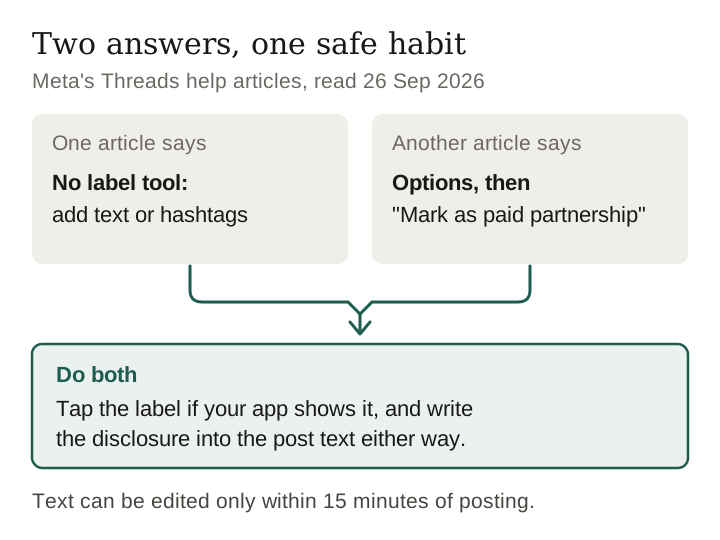
The catch: one Threads help article says Threads “currently doesn't offer the branded content tool”; another, in the same section, explains how to “Mark as paid partnership”. Use the tool if your app shows it, and write the disclosure into the post text either way. Read on Meta's help centre, 26 September 2026.
Where a link can go on Threads
| Place | What Meta's Threads help says |
|---|---|
| A post | A thread “can include short pieces of text, links, photos, videos or any combination of them” |
| Profile | You can update “your bio, username, links and profile picture”; in the editor, “Click Bio or Link” |
| Podcast field | Edit profile, then Podcast, then enter the URL; a supported service shows as a preview at the top of your profile, and connecting the RSS feed gives access to sharing tools, reminders and insights |
Instagram Help Center, Threads section: “Start a new thread on Threads”, “Edit your profile on Threads”, “Add a link to your podcast on your Threads profile”, read 26 September 2026.
This page is about permission only. Whether Threads posts get found by search engines is a separate question, and one we measured earlier from the platforms' own crawl instructions in Pinterest or Instagram for evergreen links, where Threads behaved like Instagram.

Does an affiliate post need a label?
Meta answers this one directly, which most platforms do not. Its help article “What is considered branded content” has a scenario table, and one row reads:
The same table says your own products do not take the label, while gifted and loaned products do. The Threads article on the partnership tool says it is “our branded content policies” that require it, so Threads sits under the same rules as Instagram.
That puts Meta at the strict end. Twitch, by contrast, exempts an affiliate link shared in answer to a chat question from its disclosure tool; our Twitch page sets out the difference.
Keep reading
The two articles that disagree
Both of these sit in the same section of Meta's help centre, Your Threads posts, a few lines apart.
| “Start a new thread on Threads” | “Use the paid partnership tool to tag organic branded content on Threads” | |
|---|---|---|
| Does Threads have the tool? | “Unlike Instagram, Threads currently doesn't offer the branded content tool.” | Yes: “tap Options in the top right. Tap Mark as paid partnership.” |
| How to disclose | “adding text or hashtags to the post that specify it's a paid partnership” | The tool, plus “@” and the brand's username in the text |
| Where the steps apply | Not stated | “Threads app for Android and iPhone” |
| Other details | — | Brand is notified; brands cannot remove the disclosure; partnership ads and boosting are not supported on Threads |
Both read on help.instagram.com on 26 September 2026. Meta's help pages carry no visible date, so we cannot tell which was written later.
There is a third document in play. Meta's Branded Content Policies say branded content “may only be posted where the branded content tool is available, such as Instagram posts.” Read literally alongside the first article, that would mean branded content cannot be posted on Threads at all. The second article is the one that makes the three documents consistent, which is our main reason for reading it as the current state.
Why doing both is the right answer
You do not have to decide which article is right. Doing both satisfies both:
- Open Options before posting. If “Mark as paid partnership” is there, tap it and mention the brand with “@”.
- Write the disclosure into the text anyway — “affiliate link, I earn a commission” or “#ad”. That is exactly what the first article asks for, and it is what the law cares about in any case.
For an affiliate post there is often no single brand partner to @-mention: the commission comes from a network or a retailer, not from the maker. Meta's steps assume a brand deal. Our reading is that the label still applies, since Meta's own table names affiliate links, and that the text disclosure matters more here than the mention.
The written line also does work the label cannot. It stays attached to the words if a post is quoted, screenshotted or shared onward, and the partnership steps are documented only for the mobile apps, so a post written on the web may have no label at all.
Edit window, the fediverse, and what cannot be promoted
- You have 15 minutes. Meta says a post's text can be edited within 15 minutes of posting, after which you can only delete it. Forgetting the disclosure is recoverable for a quarter of an hour.
- Fediverse sharing waits the same 15 minutes. If you share to the fediverse, Meta delays sending posts to other servers for 15 minutes to allow edits. We found nothing saying whether the partnership label travels to other servers; the text disclosure is part of the post itself.
- Prohibited in branded content across Meta: tobacco and vaping products, drugs, unsafe supplements, weapons and fireworks, adult products (family planning excepted), payday loans, multilevel marketing, ICOs and binary options, state lotteries.
- Needs Meta's written pre-authorisation before any branded content: dating, real-money gambling, pharmacies, prescription drugs, crypto, treatment centres, and government or political partners.
What we could not verify
- Which help article is newer. Neither shows a date.
- Whether every account sees “Mark as paid partnership”. We have no Threads account data and posted nothing.
- How many links a Threads profile can hold. Meta's article says “links” in one sentence and “Link” in the next and gives no number.
- Whether links affect reach on Threads. Meta publishes nothing on it, unlike Snap, which does; see our Snapchat page.
- Why this page is new. Meta's help centre renders to almost nothing for a script, so this question was set aside on 3 September until someone could read it in a browser.
What to do this week
- Open the Options menu on your next Threads draft and see whether “Mark as paid partnership” is there.
- Write a disclosure line you can paste into every affiliate post, whatever the menu shows.
- Post affiliate threads from the app, where the label steps are documented.
- Add your podcast in the profile field if you have one; it is a dedicated link slot.
- Check your programmes against Meta's pre-authorisation list before you post for them.
Frequently asked
Can you put affiliate links on Threads?
Yes. Threads posts can include links, and your profile has link fields. Meta's branded content guidance says a post with an affiliate product link should carry the paid partnership label.
Does Threads have a paid partnership label?
Meta gives two answers: one article says Threads does not offer the branded content tool, another gives steps to “Mark as paid partnership” in the app. Use the tool where your app shows it and write the disclosure in the text.
Do affiliate links on Threads need a disclosure?
Yes. Meta treats affiliate commissions as an exchange of value requiring the paid partnership label, and advertising law applies separately.
Can I add a disclosure to a Threads post after posting?
Only within 15 minutes; after that you can only delete the post. Add it before posting.
Method and scope
- All pages were opened in a real browser on 26 September 2026 and each collapsed answer was expanded and read in full.
- Your Threads posts, containing “Start a new thread on Threads” and “Use the paid partnership tool to tag organic branded content on Threads”.
- Manage your Threads profile, containing the profile and podcast-link articles.
- What is considered branded content and Branded Content Policies.
- We did not post on Threads. This page is not legal advice.
Last verified 26 September 2026 against Meta's Threads help articles and branded content policies, each opened and read in full
Keep reading
How this page was made. Drafted with AI (Claude); not yet independently re-checked. How we work