LinkToLooks · Guides · Creator Desk
Creator Desk
Can you change an affiliate link after you post it?
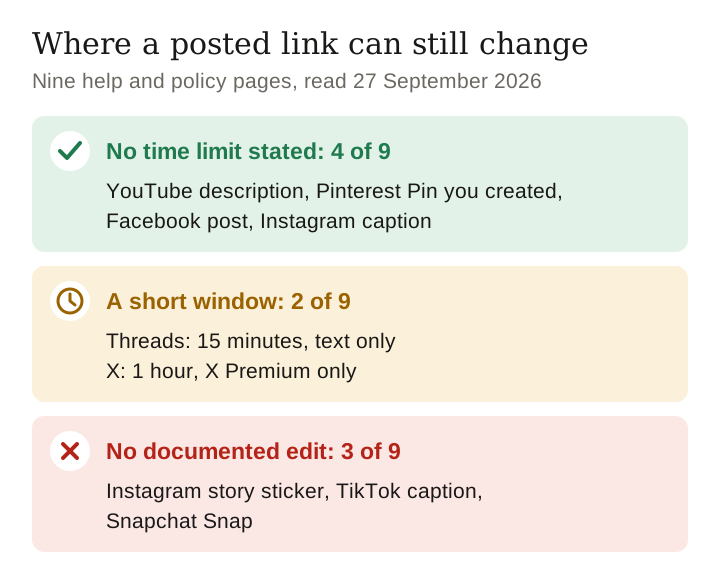
We read each platform’s own help pages on 27 September 2026 for nine places creators post links: four let you edit a posted link with no stated time limit, two give you a window of 15 minutes or an hour, and three document no way to change it at all.
Part of: For creators
It depends where the link sits. A YouTube description, a Pinterest Pin you created, a Facebook post and an Instagram caption can be edited with no time limit stated. A Threads post can be edited for 15 minutes, text only; an X post for 1 hour, and only with X Premium. Instagram stories, TikTok captions and Snapchat Snaps have no documented edit, so a link there is final once posted.
Platform rules last checked 27 September 2026 against nine help and policy pages, read in a browser
The nine surfaces, side by side
| Where the link is | Can you edit it after posting? | For how long | What the platform says, and where |
|---|---|---|---|
| YouTube video description | Yes | No limit stated | Edit in YouTube Studio > Content; descriptions hold 5,000 characters. YouTube Help: Edit video settings |
| Pinterest Pin | Yes, on Pins you created | No limit stated | Edit the Website field; not on Pins you saved from someone else; the image or video cannot change. Pinterest Help: Fix a broken link |
| Facebook post | Yes | No limit stated | Options > Edit post; photos can be removed in most cases. Facebook Help: Edit your post |
| Instagram post or reel caption | Yes | No limit stated | Options > Edit; the caption can be added, edited or deleted. Instagram Help: caption of an existing post |
| X post | Yes, if you pay | 1 hour, up to 5 edits | X Premium only; from the device you posted on; not replies, threads or pinned posts; old versions stay visible. X Help: About Edit post |
| Threads post | Text only | 15 minutes | Attachments cannot be added or removed; an “Edited” label appears if anyone interacted first. Instagram Help: Edit your post on Threads |
| Instagram story sticker | Not documented | — | For product stickers Instagram says to share the photo again; the link-sticker page describes no edit. Instagram Help: product tags in stories |
| TikTok video caption | Not documented | — | The help centre’s editing articles cover the screen before you post; after posting it documents delete and restore. TikTok Help: Editing, posting and deleting |
| Snapchat Snap link | Not documented | — | Links attach on the Preview screen; the Commercial Content Policy bans changing URL content after submission to get around review. Snap Commercial Content Policy |
“Not documented” means we found no edit route on the platform’s own help or policy pages on 27 September 2026. It does not prove the app has no hidden control; it means you cannot plan on one. We did not test any of this inside an account.
Counted: 4 of 9 surfaces allow an open-ended edit, 2 of 9 give a short window, and 3 of 9 document none. That split is the practical answer, because a link you will need to change later belongs on one of the first four.

Where a link stays editable
YouTube descriptions
- YouTube Studio > Content > select the video > edit the details > Save. The same page covers the title and thumbnail.
- The description allows 5,000 characters. YouTube also documents a “Correction:” format for fixing mistakes in the video itself.
- This is why the description is where YouTube affiliate links belong: it is the one link slot on the video you can always come back to.
Pinterest Pins
- On a Pin you created: open it, click the edit icon, change the Website field, Save. Pinterest says that if it blocked your link, or you added the wrong website to one of your Pins, “you can edit it.”
- You cannot edit the link on a Pin you saved from someone else, and you cannot replace a Pin’s image or video; that needs a new Pin.
- Pinterest may itself replace a link that leads to a blank page with “a more useful one”. A dead product link on Pinterest does not always stay yours.
Facebook posts and Instagram captions
- Facebook: Options > Edit post > Save. You can only edit posts you shared.
- Instagram: Options > Edit on the post, and the caption can be added, edited or deleted. Our guide to adding affiliate links to Instagram covers which Instagram surfaces carry a working link at all.
Keep reading
Where you get a window
Threads: 15 minutes, text only
- “You can only edit a post within 15 minutes of posting.” Only the text changes; you cannot add or remove attachments.
- A link typed into the text can therefore be fixed inside the window. After it, the only route Threads offers is to delete the post.
- If anyone likes, replies or reposts before you finish, the post shows “Edited”.
X: one hour, and only with Premium
- Up to 5 edits within 1 hour of posting, for X Premium subscribers, from the same device you posted on.
- Replies, posts in a thread, pinned posts and posts made through third-party tools cannot be edited at all.
- Every earlier version stays one click away for anyone who looks, so a swapped link is visible as a swap.
Where a posted link is final
Instagram story stickers
- Instagram’s link-sticker help describes adding the sticker and how it behaves in ads; it describes no way to change the link on a story already shared.
- For product stickers the instruction is explicit: “To edit a product sticker in your story, you have to share the photo again.”
- Stories disappear after a day unless you keep them as highlights, which makes this matter most for highlights.
TikTok captions
- We read TikTok’s two editing articles. Both describe the screen before you post: text, stickers, clips, sound. After posting, the documented actions are delete, and restore within 30 days.
- A link belongs where TikTok actually supports one, and that is not the caption of a finished video.
Snapchat Snaps
- A link attaches to a Snap from the paper-clip icon on the Preview screen, before sending. We found no help article on changing it afterwards.
- Snap’s Commercial Content Policy goes further and lists “modifications to URL content following submission in an attempt to circumvent review” as deceptive.
What about changing where a redirect goes?
A short link or link-in-bio redirect you control can point somewhere new without touching the post, on every platform. Two platforms have written rules that bear on it:
- Pinterest says it blocks “links that redirect to other pages” in some cases and does not allow “certain redirects or URL shorteners”, and advises linking straight to the source. Our link-shortener guide covers what one extra redirect hop costs.
- Snap bans changing the URL’s content after submission to get around review.
Our reading, and it is a reading rather than a ruling from either platform: repointing a dead link to the same product at another shop is a repair; repointing a reviewed post to a different offer is what Snap’s rule names. If a follower tapping today would land on something the post never showed, do not swap it; post again.
What to do this week
- Put links you may need to change on an editable surface. For gear that sells out or changes price, that means the YouTube description, a Pin you created, or your profile link, not a story sticker or a Snap.
- Open every link before you post on Threads or X. Your whole correction window is 15 minutes or one hour.
- List your story highlights that carry product links. Those are the links you cannot fix in place; replacing the story is the only route.
- Keep your own record of what you linked where. Our guide to keeping a link archive shows a format, and auditing 500 links in an afternoon shows how to find the dead ones.
Frequently asked
Can I edit a link in a YouTube description after posting?
Yes. YouTube Studio lets you change a video’s description at any time from Content, with no time limit stated. Descriptions hold up to 5,000 characters.
Can I change the link on a Pinterest Pin?
Yes, on Pins you created: open the Pin, click edit and change the Website field. You cannot change the link on a Pin you saved from someone else.
How long can I edit a Threads post?
15 minutes after posting, and only the text. Attachments cannot be added or removed, and after the window the only option Threads documents is deleting the post.
Can I edit an Instagram story link sticker?
Instagram documents no edit for a shared story’s link sticker. For product stickers it says to share the photo again, and that is the practical route for a link too.
Can I edit a post on X to fix a link?
Only with X Premium, within 1 hour, up to 5 times, from the device you posted on. Earlier versions stay visible to anyone.
Keep reading
How this page was made. Drafted with AI (Claude); not yet independently re-checked. How we work